Full inventory
Servers, databases, virtual desktops, and apps, including Windows Server, Linux, SQL Server, VMware, VDI, and SAP.
Azure Migration Readiness Review · Prepare
Part of Azure & Applications
A two-to-three-week review of your servers, databases, desktops, and apps that ends with an Azure architecture, a cost estimate, and a dated migration plan.
Three minutes. No email needed.
A short form. We reply within one business day.
Who it is for
What you get
Servers, databases, virtual desktops, and apps, including Windows Server, Linux, SQL Server, VMware, VDI, and SAP.
A list of everything out of support, or about to be.
An Azure landing zone and architecture designed for your workloads.
With options to phase the move to budget.
A security baseline with Microsoft Defender for Cloud, designed in before the first workload moves.
Your data residency and sovereignty requirements, written down and designed in.
One workload moved or rebuilt to prove the plan.
Milestones your board can approve.
From $7,500, with the fixed fee in writing before you commit. Microsoft licensing and any Azure consumption are separate from the Centered Networks fee.
Microsoft programs may help fund or accelerate eligible engagements; eligibility is confirmed before scope.
Proof. Centered Networks led the Azure architecture for the National Mall Gateway; application development was delivered with project partners. Read the Microsoft customer story.
How it works
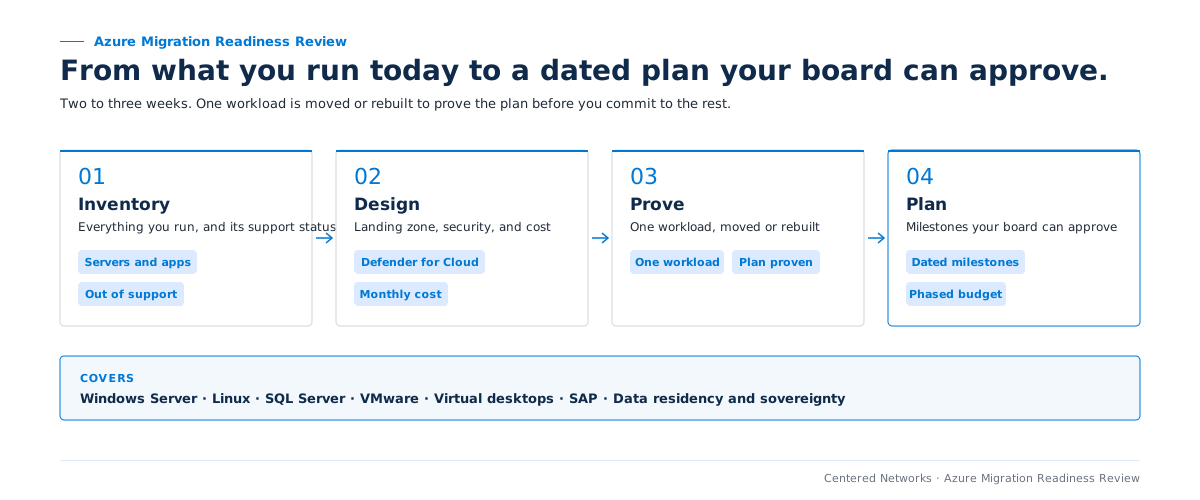
The migration itself is scoped separately, and its timeline is set in the migration plan.
Scenarios in scope
The review covers each scenario below and says which path fits each workload.
Windows Server, Linux, and SQL Server, including anything at or near end of support. Each workload is marked to move as is, modernize, or rebuild.
VMware estates facing a renewal or a hardware refresh, with the option to move hosts as they are or modernize workload by workload.
Legacy VDI assessed for Azure Virtual Desktop or Windows 365. Cloud PC Quickstart runs the desktop pilot.
SAP workloads inventoried and sequenced in the plan, with the architecture and cutover steps they need.
Requirements from funders, regulators, or the board, written down and designed into regions, access, and controls.
Related engagements
Prepare
Already on Azure? Review one production workload against the five pillars.
See Azure Well-Architected Review →Operate
Build and run Azure applications once the workloads have moved.
See CompleteCare Build →Prepare
Modernize the databases and reporting that move with the servers.
See Data Estate Readiness Review →The review proves one workload first, and the plan schedules each cutover around your operations with a rollback step.
The review puts what your servers cost to run today side by side with the monthly Azure estimate, so you can compare before anything moves. The plan can phase the move so the basics go first and the rest follows when budget allows.
Yes. The review covers each of those, and the plan says which path fits each workload.
Tell us what is running on premises and what is forcing the question: end of support, a VMware renewal, a hardware refresh, or a residency requirement. We confirm scope and access before scheduling.
Not sure this is the first move? Take the three-minute Opportunity Finder (no email needed), or see the paid 90-Day AI Roadmap.
In business since 2004, serving nonprofits and mission-driven organizations the entire time.
A senior member of our team will reach out within one business day to confirm scope and next steps.