Service · M365 InstantOn

The server is gone. The discipline isn’t.

M365 InstantOn is the productized way to bring real operating discipline to your Microsoft 365 tenant. We deploy a CIS-certified security baseline across identity, devices, email, collaboration, and data protection in 14 calendar days, then keep it aligned with continuous drift detection, monthly uplift releases, and a Quarterly Roadmap Review. Fixed price, fixed scope, fixed timeline.

Microsoft Solutions Partner Nonprofit charity tenant authorization CIS-certified baseline Portability Promise

The activation gap

Your Microsoft 365 license is the simple part. Operating the tenant isn’t.

When you ran a file server, your IT partner monitored it, patched it, hardened it, and backed it up. That server is gone. Microsoft 365 is your infrastructure now, and most nonprofits stopped getting the discipline that used to surround it. They pay Microsoft for the tenant and assume Microsoft runs it. Microsoft runs the platform. Nobody is running the tenant.

Most of the nonprofits we talk to are paying for Microsoft 365 Business Standard or Microsoft 365 Business Premium, and most of those tenants are 30 to 50 percent activated. MFA is enforced on some accounts but not all. Conditional Access exists, but coverage is unclear. Devices aren’t all in Microsoft Intune. SharePoint and OneDrive sharing controls sit at their defaults. There is no documented baseline, no source of truth, no audit trail.

That isn’t a competence problem. It’s a productization problem. The Microsoft 365 surface is wide, the configuration space is enormous, and the work of activating, hardening, and continuously managing it has historically only existed as expensive custom consulting or as a black-box managed service.

M365 InstantOn is a third option.

Why this matters now

Four shifts that changed what it takes to run Microsoft 365.

Four stacked pillars labeled Tenant, Identity, AI, and Operations, showing the shift from on-premise discipline to managed tenant operations: the tenant is the new server, identity is the new perimeter, AI is the new opportunity, and centralized repeatable security is no longer optional.

The tenant is the new server. When you ran a file server, your IT partner monitored it, patched it, hardened it, and backed it up. Your tenant deserves the same operating discipline. Microsoft runs the platform; your tenant is yours to run.

Identity is the new perimeter. Your perimeter walks out the door every evening on laptops, phones, and personal devices. Conditional Access, MFA enforcement, device compliance, and session controls are the modern equivalent of a locked front door. For a 50-person nonprofit or a 17-bed hospital, the math is more urgent, not less.

AI is the new opportunity. Microsoft 365 Copilot respects existing permissions and labels, which means a tenant with forgotten over-shares and missing labels will surface confidential HR files, donor records, or PHI to people who shouldn’t see them. The opportunity is real. The data foundation has to come first.

Centralized, repeatable security is no longer optional. Microsoft pushed more than fifty updates to Entra, Intune, and Defender alone last year. CIS recommended forty-eight changes to Windows policies in Intune in the same window. No one is going to read every release note, apply every change to your tenant by hand, and remember to do it again next month. The work has to be centralized, baselined, and repeatable, or it doesn’t get done.

How it works

The InstantOn Method: two parts, one outcome.

A 14-day productized Launch, then a continuously managed lifecycle. Both ringed for safety. Both built on a CIS-certified baseline. Both designed for organizations that need real operating discipline without the cost of building it themselves.

A horizontal 14-day Launch sequence showing five milestones: Pilot ring (2 to 3 named users) on Days 2 to 3, Canary ring (a representative cross-functional slice) on Days 6 to 9, Broad ring (everyone else) on Days 10 to 12, Validation and handoff on Days 13 to 14, with a Day-30 KPI Report milestone and a 14-Day Launch Promise badge.

Part one · Activation

M365 InstantOn Launch

$10,000 one-time fixed fee

A 14-day productized Launch against a pre-built, CIS-certified baseline tuned to your license mix: Microsoft 365 Business Premium, E3, or E5. Every change is staged in a documented change ticket with a named approver, deployed inside an approved change window, and snapshotted automatically. Every deployment rings out from Pilot (2 to 3 named users) to Canary (a representative cross-functional slice) to Broad (everyone else), report-only first wherever Microsoft supports it.

What you get in 14 days

  • A CIS-certified security baseline deployed across Microsoft Entra ID, Microsoft Intune, Microsoft Defender for Business and Office 365, Exchange Online Protection, SharePoint, OneDrive, Microsoft Teams, and Microsoft Purview
  • MFA enforced across all accounts, with Conditional Access tuned to your sign-in patterns
  • Microsoft Intune enrollment and compliance baselines for Windows, with macOS, iOS, and Android supported where licensing applies
  • Microsoft Defender for Office 365 Safe Links, Safe Attachments, anti-phishing, and mailbox auditing
  • SharePoint and OneDrive sharing guardrails, with Teams safety defaults
  • Starter Microsoft Purview sensitivity labels and DLP in audit-first mode
  • A pre-change snapshot and rollback path for every deployed policy
  • The Tenant Audit Report v1, a branded section-by-section view covering Licensing, Secure Score, User Accounts, Administrative Roles, Conditional Access, Entra ID, Exchange Online, SharePoint, OneDrive, and Teams
  • The Cyber Insurance Evidence Pack v1
  • The Copilot Pre-Wire Checklist
  • A Day-30 KPI Report: Secure Score lift, Conditional Access coverage, device compliance

What the baseline targets

A Secure Score lift in the 20-to-30-point range during the first 30 days, Conditional Access coverage above 95 percent of sign-ins, and device compliance above 90 percent of managed devices by Day 30. Pre-validated against your license mix at kickoff.

Part two · Lifecycle

M365 InstantOn Managed

$1,000 per month, 12-month minimum

Continuous lifecycle management for a tenant that has already been baselined: continuous drift detection, a monthly uplift release, and quarterly executive briefings. Month-to-month after the first year, 30 days’ written notice to cancel.

What you get every month

  • Continuous drift detection across identity, devices, email, sharing, and data policies; daily drift reports surfaced as tickets in our service desk with named owner and triage path
  • Daily automated baseline snapshots; approved rollback to last-known-good completed within 4 business hours, often inside one
  • A monthly uplift release that packages Microsoft’s safety updates into a controlled adoption path your team reviews and approves
  • Reviewed change management: every change to your baseline staged in a change ticket with a named approver and an approved change window
  • A monthly Tenant Audit Report excerpt, board-ready and free of jargon
  • A quarterly 60-minute Roadmap Review with your Executive Director or Chief Operating Officer
  • Microsoft Roadmap Watch: a heads-up before Microsoft changes land
  • A direct Admin Q&A Channel for your IT lead, one-business-day response standard
  • An annual baseline refresh suitable for cyber insurance and audit
  • The Portability Promise, in force every day of the engagement

What your team commits

During the 14-day Launch, your IT or operations lead invests approximately 2 hours per week (about 4 hours total) reviewing the baseline, attending the Pilot kickoff, approving the Broad cutover, and joining the Day-14 walkthrough. During Managed, about 30 minutes per month, plus the quarterly 60-minute Roadmap Review and the annual baseline refresh session.

The clean offer is the pair: $22,000 in Year One, then $12,000 per year ongoing. A 12-month minimum on Managed, month-to-month after that with 30 days’ written notice to cancel. The Portability Promise stays in force regardless.

A bifurcation diagram showing two paths after the Day-30 KPI Report: roughly 70 percent of InstantOn clients graduate to CompleteCare Foundations with their InstantOn engagement credited toward kickoff, while roughly 30 percent self-operate while keeping the documented baseline, runbooks, and CSP relationship.

For Critical Access Hospitals and clinical facilities

For 17-bed Critical Access Hospitals, Federally Qualified Health Centers, and rural community health centers, we operate a purpose-built variant: the M365 InstantOn Critical Access Hospital Edition at $15,000 Launch plus $2,500 per month Managed. It carries the Bedside-Safe Migration Method, the Continuity Promise, the Joint Commission Email Posture Memo, and the Grant-Documentation Pack as standard deliverables. See the editions section below.

Two editions

One method, two editions. Priced for the risk.

The same operating discipline, tuned for two different risk profiles. The Standard edition is engineered for non-clinical nonprofits and community-serving organizations where a recovery takes a weekend. The Critical Access Hospital Edition is engineered for clinical facilities where a recovery takes patient care.

Side-by-side comparison of the two M365 InstantOn editions: Standard at $10,000 Launch plus $1,000 per month for nonprofits with 50 to 500 staff using the InstantOn Method, and Critical Access Hospital Edition at $15,000 Launch plus $2,500 per month for Critical Access Hospitals, FQHCs, and rural community health centers using the Bedside-Safe Migration Method, with the Continuity Promise, Joint Commission Email Posture Memo, and Grant-Documentation Pack as added deliverables.

Standard

$10,000 Launch + $1,000 per month Managed

Built for

Nonprofits with 50 to 500 staff and annual budgets between $5M and $50M. Non-healthcare or healthcare-adjacent without acute clinical risk.

Methodology

The InstantOn Method (Pilot, Canary, Broad rings across 14 calendar days).

Carried guarantees

  • 14-Day Launch Promise
  • Continuity Promise
  • Portability Promise

Standard deliverables

  • CIS-certified security baseline
  • Cyber Insurance Evidence Pack
  • Board-Ready Outcome Brief
  • Copilot Pre-Wire Checklist
  • Tenant Audit Report (quarterly cadence)

Critical Access Hospital Edition

$15,000 Launch + $2,500 per month Managed

Built for

Critical Access Hospitals (under 25 beds), Federally Qualified Health Centers, rural community health centers, and any clinical facility where a help-desk surge could affect patient care.

Methodology

The Bedside-Safe Migration Method (clinical-calendar-aware cutover, no deployments during code-stroke windows, shift handoff, or known admissions peaks; 14 calendar days).

Carried guarantees

  • 14-Day Bedside-Safe Promise
  • Continuity Promise (clinical scope: six-month engagement extension at no charge if a clinically-significant outage is traceable to our configuration)
  • Portability Promise

Standard deliverables

  • Everything in Standard
  • BAA executed before kickoff
  • Clinical secondary escalation contact on the rollout schedule
  • HHS 405(d) alignment built into the baseline
  • Joint Commission Email Posture Memo as a standard deliverable
  • Grant-Documentation Pack for HRSA, USDA Rural Development, and state rural health grant cycles

Risk reversal

Three guarantees. None of them cosmetic.

We stack them because nonprofit operations and IT leads carry three distinct fears: during the activation, after it, and about the relationship itself. Each guarantee names the remedy in dollars or in time.

Three numbered guarantee cards for M365 InstantOn: the 14-Day Launch Promise with a first-month-of-Managed credit if we miss, the Continuity Promise covering operational continuity in the first 12 months, and the Portability Promise covering exportable baseline and runbooks at any time.

01

The 14-Day Launch Promise

If Launch isn’t complete in 14 calendar days of signed kickoff, your first month of Managed is free, a $1,000 credit on the Standard track. If it isn’t complete in 21 days, the first month of Managed is free and we also waive $2,500 of the Launch fee.

We can stand behind this because the Launch is productized. We don’t design from scratch on your time. Pilot Day 2 to 3, Canary Day 6 to 9, Broad Day 10 to 12, Validation and handoff Day 13 to 14. The Day-30 KPI Report follows. The CAH Edition carries the equivalent 14-Day Bedside-Safe Promise, with clinical-continuity remedies if any single clinical workflow disruption is caused by our work during cutover.

02

The Continuity Promise

During Managed, if a drift event traces back to our configuration and goes undetected past the daily drift report, the affected month is credited. If it causes a security incident, we extend the engagement six months at no charge and bring in a senior engineer to re-baseline the affected area. The Critical Access Hospital Edition extends this promise to clinical continuity: a six-month extension at no charge if a clinically-significant outage is traceable to our configuration in the first 12 months.

Continuous drift detection runs every day across identity, devices, email, sharing, and data policies. Drift events surface as tickets in our service desk with a named owner inside 24 hours, not as findings in a dashboard nobody opens. Approved rollback to last-known-good completes within 4 business hours, often inside one.

03

The Portability Promise

Nothing about your baseline is locked inside a proprietary box. On request, at any time, we deliver a portable export of your baseline configuration, every runbook in Markdown that you own forever, your change history, and a documented offboarding path including rollback artifacts and an offboarding walkthrough. No offboarding fee. No data hostage.

The Portability Promise is structural, not aspirational. The artifacts you keep are not proprietary scripts in a language no one else uses; they are documented configuration baselines and operational runbooks that any competent Microsoft Partner can read and continue from. The unlock isn’t that we’re nice. The unlock is that the design has no lock-in to engineer out of.

Built for nonprofits with 50 to 500 staff.

Side-by-side comparison of M365 InstantOn (a 14-day productized Launch and continuous Managed service) and CompleteCare Foundations (an ongoing recurring managed-services tier), with a connector showing that roughly 70 percent of InstantOn clients graduate to Foundations.

This is built for you if

  • You’re a 501(c)(3) with 50 to 500 staff and an annual budget between $5M and $50M
  • You’re on Microsoft 365 Business Standard, Business Premium, E3, or E5
  • You want a documented baseline you can hand to your IT lead, your board, your auditor, and your cyber insurance underwriter
  • Leadership is asking about Microsoft 365 Copilot, and you want the answer to be “yes, the tenant is ready”
  • You’d rather pay a fixed fee than negotiate every change

This isn’t a fit if

  • Your nonprofit has fewer than 50 staff; the per-tenant economics don’t work, though we’re glad to make a referral
  • You have more than 1,000 staff; that’s a different procurement cycle and we can point you toward scoped enterprise alternatives
  • You won’t move to Microsoft 365 Business Premium licensing, which the Microsoft Defender and Microsoft Intune baseline depends on
  • You want a set-it-and-forget-it engagement with no ongoing accountability; Managed is built for active partnership

At a Critical Access Hospital or rural community health center?

We operate a purpose-built variant of this offer, the M365 InstantOn Critical Access Hospital Edition, with the Bedside-Safe Migration Method, the Continuity Promise, the Joint Commission Email Posture Memo, and the Grant-Documentation Pack as standard deliverables. $15,000 Launch plus $2,500 per month Managed. See our work with rural hospitals →

In practice

What this looks like in practice.

Human services, 50 to 150 staff

Inherited a tenant with MFA on roughly 60 percent of accounts, Conditional Access partially configured, and no Microsoft Intune. Launch completed in 11 days. Secure Score moved into the high seventies over the first 30 days; Conditional Access coverage settled above 95 percent of sign-ins; device compliance reached 92 percent by Day 30. The Operations Director reported recovering 4 to 6 hours a week within the first month.

“We had been quoted this work three times by three different MSPs. Every quote came back over $40,000, with a six-month timeline and a managed-services tail we couldn’t escape. This was the opposite of all of that.”

Operations DirectorRepresentative client profile

Faith-based organization, 200 to 400 staff

Multi-site, mixed device fleet, legacy authentication still enabled in two departments. Launch completed in 13 days with a five-day Pilot validation in the IT department before the broader rollout. Zero help-desk surge on cutover day. The IT Director used the Cyber Insurance Evidence Pack to negotiate a premium reduction at the next renewal; the exact figure depends on carrier and starting posture.

“The Portability Promise was the unlock. Every prior MSP wanted us inside their platform. Centered handed us a documented baseline and a runbook set, and told us we owned them.”

IT DirectorRepresentative client profile

Arts and cultural organization, 75 to 125 staff

Came in through the Readiness Assessment, which confirmed that Microsoft 365 Business Standard was leaving security capabilities on the table. We co-developed the business case for a Business Premium uplift, then ran Launch. They are now nine months into Managed, with quarterly Roadmap Reviews anchored on the Tenant Audit Report.

“What I appreciated most was that we never felt sold to. Every conversation was about what the organization needed, not what they were trying to upsell.”

Executive DirectorRepresentative client profile

The numbers above are what the baseline targets in similarly licensed environments, not guaranteed averages. Your starting posture, your license mix, and your governance maturity will move the dial up or down. We pre-validate the target range at kickoff.

How M365 InstantOn compares.

The same operating discipline, priced and delivered three different ways.

M365 InstantOn compared with a national MSP retainer and an in-house Microsoft engineer.
M365 InstantOn National MSP retainer In-house Microsoft engineer
Year One total $22,000 $60,000 to $120,000 $140,000 to $180,000
Pricing model Productized, fixed Hourly or custom retainer Fully loaded salary
Timeline to baseline 14 calendar days 60 to 120 days 90 to 180 days
Configuration ownership You own your baseline configuration and runbooks (Portability Promise) The MSP’s platform Yours, but undocumented
Drift detection Continuous; daily drift reports; tickets in our service desk inside 24 hours Variable, often manual Whatever the engineer prioritizes
Nonprofit specialization Built for nonprofits with 50 to 500 staff Generic SMB or enterprise Depends on the hire
Exit cost None. Portability Promise applies. Often substantial; lock-in is common. Recruiting and re-hiring cost.

Copilot readiness

Copilot ready, not Copilot exposed.

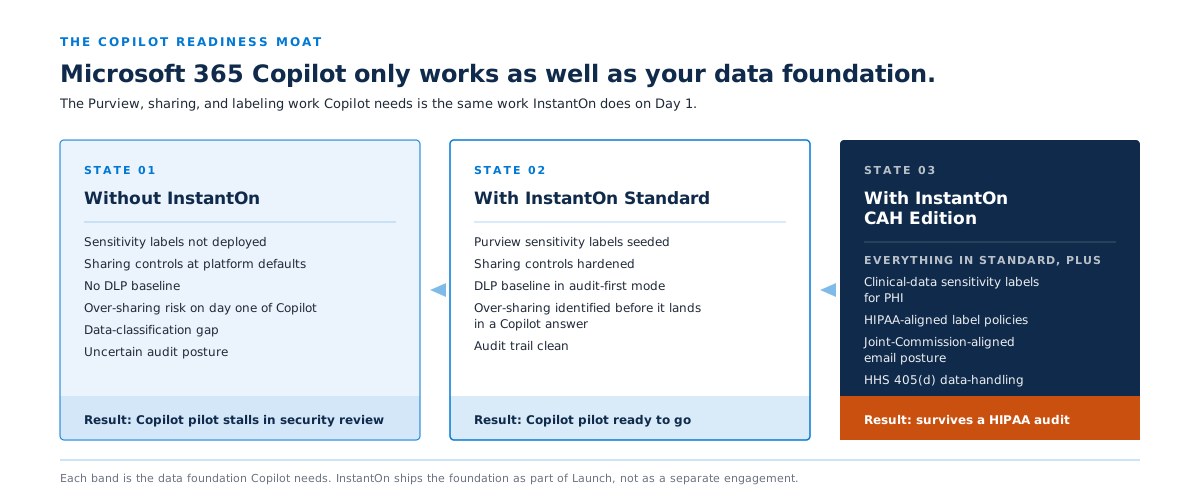
A diagram showing the Microsoft Purview data-governance moat surrounding Microsoft 365 Copilot: DLP policies, sensitivity labels, and retention policies sit between Copilot and a tenant's documents, contrasted against an unmoated tenant where Copilot can surface confidential HR files, donor records, and PHI to users with forgotten permissions.

Microsoft 365 Copilot respects the permissions and labels already in your tenant. That sounds reassuring until you consider what most tenants actually look like underneath: forgotten over-shares, missing sensitivity labels, retention policies set to defaults, project sites from three years ago with the original membership still attached. Copilot will use exactly the permissions you’ve already set. That’s the good news. It’s also the bad news.

The platform we operate on is the only multi-tenant approach to Microsoft Purview in the MSP space. That matters because Purview is the data-governance foundation Copilot needs: DLP policies, sensitivity labels, and retention policies, deployed and maintained at the baseline level. Without it, Copilot is decorating the house before the foundation is built.

What InstantOn deploys before Copilot is safe to turn on

  • Microsoft Purview foundation: DLP rules in audit-first mode with built-in sensitive-info classifiers, starter sensitivity labels, retention policies aligned to your records-retention posture
  • The Copilot Readiness Assessment: a four-dimension score covering M365 adoption, security, technical readiness, and data governance, with a prioritized remediation list
  • The Copilot Pre-Wire Checklist: the specific controls Copilot relies on, documented so your IT lead can verify readiness in one sitting
  • Ongoing shadow-AI visibility: per-user Copilot adoption, dormant-license detection so you can reassign seats, and visibility into other AI sessions across the tenant

When leadership asks “are we ready for Copilot?”, the answer is yes, not “let me check.”

Cyber insurance

Your cyber insurance evidence pack pays its way.

At renewal, underwriters now ask nonprofits for MFA coverage percentages, Conditional Access deployment evidence, device compliance documentation, and audit logging proof. Most nonprofits we talk to don’t have any of this packaged into evidence an underwriter can actually read.

The Cyber Insurance Evidence Pack is included as a Launch deliverable and refreshed annually with Managed. It packages your Conditional Access coverage report, MFA enforcement evidence, device compliance posture, audit logging proof, and baseline configuration history into the format underwriters expect. Clients have used the Pack to negotiate premium reductions at renewal; the magnitude varies by carrier, broker, and starting posture. For most nonprofits, even a modest reduction at first renewal recovers a meaningful share of the annual Managed fee.

A lower-commitment start

Start with a Readiness Assessment.

Not ready to commit to a Launch? A fixed-fee Readiness Assessment is the lower-commitment way in.

What the $1,950 assessment delivers

  • A current-state review across identity, endpoints, email, collaboration, and data protection
  • A gap heatmap against the M365 InstantOn baseline and your choice of framework lens (CIS Controls v8, HIPAA Security Rule administrative and technical safeguards, NIST CSF, or Essential 8)
  • A license alignment review that often surfaces $5,000 to $30,000 a year of underused or mismatched licensing
  • Your top risks and quick wins
  • A recommended Pilot scope
  • A budgetary roadmap

Sign a Launch within 30 days and the full $1,950 credits to the Launch fee. You keep the assessment either way.

Questions

Frequently asked questions about M365 InstantOn.

What happens to our current MSP?

You decide. M365 InstantOn operates the Microsoft 365 layer specifically: identity, devices, email, collaboration, and data protection. If your current MSP handles help desk, hardware, network, or other infrastructure, they can keep doing that. We coexist regularly. If your MSP currently does some Microsoft 365 work, we’ll work with you on a clean handoff so nothing falls through the cracks.

We’re already paying for Microsoft 365. Why is this a separate cost?

Microsoft 365 licensing gives you the capability. Operating discipline gives you the outcome. Microsoft doesn’t tune Conditional Access for your environment, configure Microsoft Intune for your device fleet, deploy Microsoft Purview labels for your data, watch for drift, or document the baseline. That continuous work is what M365 InstantOn is. The license is a prerequisite, not a substitute.

What if we want to leave after 12 months?

You give 30 days’ written notice and cancel. We do an offboarding walkthrough to make sure the handoff is clean. Under the Portability Promise, you keep a portable export of your baseline configuration, every runbook in Markdown, your change history, and a documented rollback path. No offboarding fee. No data hostage. Any competent Microsoft Partner can pick up where we left off, or your own team can.

What’s the actual tech backbone? Is this Microsoft365DSC?

We operate your baseline on a purpose-built, CIS-certified, MSP-grade multi-tenant policy management platform. It’s the same class of operational tooling used by Microsoft’s 2024 Partner of the Year, and it gives our team single-pane visibility into your tenant’s policy state, daily drift detection across identity, device, email, sharing, and data layers, automated baseline snapshots with a documented rollback path, and branded customer-facing reporting. You don’t manage the platform; we do. Your baseline is exportable and portable under the Portability Promise. We don’t name our underlying platform vendor in customer-facing materials because the productized offer is ours, not theirs, but we’re glad to walk through the operational architecture in detail on the fit call or under NDA if it matters to your team.

Is M365 InstantOn aligned to HIPAA, CJIS, or state-specific frameworks?

The baseline ships with mappings to CIS Controls v8, HIPAA Security Rule administrative and technical safeguards, HHS 405(d), NIST CSF, Essential 8, and CMMC. We provide a Business Associate Agreement for healthcare-adjacent work on request. The Critical Access Hospital Edition adds clinical-continuity engineering and a Joint Commission Email Posture Memo. For Criminal Justice Information Services, state-specific frameworks, or other regulated-data scenarios, we’ll discuss scope on the fit call. We won’t take an engagement we can’t deliver against.

We’ve been burned by an MSP before. Why is this different?

Three things make this materially different from a generic MSP engagement. First, the Portability Promise: your baseline configuration, runbooks, and change history are yours from Day 1, with a documented offboarding path. There is nothing for us to lock you into. Second, productized delivery: fixed scope, fixed timeline, fixed price, ringed rollout. Third, the stacked guarantees: the 14-Day Launch Promise, the Continuity Promise, and the Portability Promise all carry concrete remedies if we miss. We put our delivery economics on the same side of the table as your outcomes.

Can we see what the monthly reporting looks like?

Yes. Email us and we’ll send a sample Tenant Audit Report with anonymized data. Or, if you want to see it against your own tenant context, the Readiness Assessment includes a sample report based on your environment.

How do you handle exceptions to the standard baseline?

Every tenant has exceptions: a service account that can’t carry MFA, a vendor app that needs sharing relaxed, a regulated workflow that requires custom DLP. We capture every exception in the exception log, apply it through reviewed change management with a named approver and an approved change window, and review the exception list quarterly. Heavy exception handling outside the standard baseline may scope up, and we’ll flag that on the fit call.

What if our IT lead leaves during Managed?

The operating model survives them. That’s the point of a documented baseline, a runbook set, and a quarterly Roadmap Review cadence. Onboarding a new IT lead is a two-hour walkthrough of the baseline and the Tenant Audit Report, not a six-month archaeology project. We do that walkthrough with you when the time comes.

Do you do Microsoft 365 migrations from Google Workspace or on-premises Exchange?

Migration is scoped separately. M365 InstantOn is built for organizations already on Microsoft 365 that need the tenant operated with real discipline. If you’re migrating into Microsoft 365 from another platform, talk to us on the fit call. We may bundle the migration into Launch or scope it as a separate prior engagement, depending on complexity.

What’s the capacity for Launch engagements?

We accept four net-new Launch engagements per quarter on the Standard track, and two on the Critical Access Hospital Edition. That’s the operational ceiling for our delivery team while honoring the 14-Day Launch Promise. When a quarter fills, the next quarter opens for booking. No urgency theater: real deadlines are urgency enough.

The No-Lock-In Promise: month-to-month from day one, we earn each renewal, written notice and you're out. No 12-month contract, no 36-month auto-renewal, no termination fee. The structural commitment is on us, not on you.

Book a 30-minute fit call.

We come prepared with what we can already see about your environment. You walk us through what we’re missing: your size, your stack, your timeline, your constraints, your funder and audit pressures. You leave with a written fit assessment either way, and no pressure to commit on the call.

If we agree it’s a fit, kickoff is within five business days. If we agree it isn’t, you keep the assessment and use it however helps.

Not ready for a fit call? Start with a Readiness Assessment, pair Launch with a Discovery Sprint if an AI roadmap is also in view, or email us at sales@centerednetworks.com and we’ll point you toward something useful, even if it isn’t us.

This field is required
Valid email required
This field is required

Thanks, we’ve got it.

A senior member of our team will reply within one business day to set up your fit call.

Microsoft alignment

A Microsoft Solutions Partner for Modern Work and Security.

M365 InstantOn sits squarely in the Modern Work designation: identity, productivity, and collaboration as a single, governed stack. The Security designation matters here because Microsoft Defender, Microsoft Entra ID Conditional Access, and Microsoft Purview are the foundation of every InstantOn engagement. Centered Networks holds both designations.

Microsoft Solutions Partner for Modern Work designation badge. Microsoft Solutions Partner for Security designation badge.
  • Microsoft Solutions Partner for Modern Work
  • Microsoft Solutions Partner for Security
  • Nonprofit charity tenant authorization
  • CIS-certified baseline
  • HIPAA BAA available on request
  • 501(c)(3) verification required