Microsoft · Licensing and resale

We’re your Microsoft CSP for nonprofit licensing.

As a Microsoft CSP authorized for the Nonprofit Program, we help 501(c)(3)s, foundations, and rural hospitals access free Microsoft 365 Business Basic and discounted licensing, and run it as your Partner of Record.

Microsoft Solutions Partner, five designations · Microsoft partner since 2004 · 60+ nonprofit tenants under management · Up to 75% off for qualifying nonprofits

Why it matters

Your CSP isn’t just a billing arrangement. It’s who Microsoft sees as your partner.

Microsoft sells most of its commercial and nonprofit licensing through the Cloud Solution Provider channel. Your CSP is who Microsoft recognizes as your Partner of Record.

The Partner of Record gets credit for your tenant, gets access to Microsoft incentives, and is the partner Microsoft account teams engage on co-sell opportunities, grant placements, and program enrollments. If your licensing is sitting under a CSP that does not specialize in nonprofits, you are probably:

  • Missing nonprofit-specific discounts you qualify for (Microsoft Nonprofit Program, Rural Health Resiliency Program, FastTrack credits).
  • Paying for SKUs that do not fit your user mix.
  • Without a partner who can navigate Microsoft’s nonprofit eligibility, grant-license rules, and the TechSoup validation flow on your behalf.
  • Not getting Microsoft account team attention because your Partner of Record is not engaged on nonprofit motions.

Free Microsoft 365 Business Basic for up to 300 users, plus up to 75% off paid licensing.

The Microsoft Nonprofit Program offers substantial licensing benefits to qualifying 501(c)(3) organizations. Microsoft restructured the program effective July 1, 2025: the legacy Business Premium and Office 365 E1 grants were retired, and Business Basic became the entry-level grant.

Grant-funded licenses

Free for eligible nonprofits

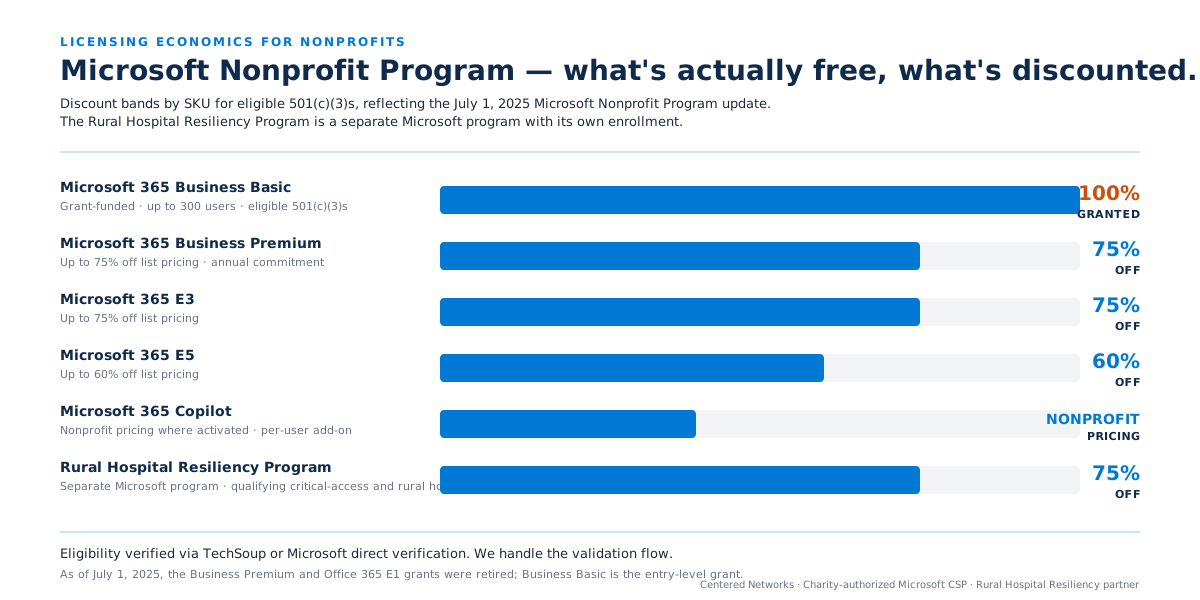
  • Microsoft 365 Business Basic: free for up to 300 users for eligible 501(c)(3)s
  • Office 365 F1: grant-funded for frontline workers (subject to Microsoft’s current grant rules)
  • Azure sponsorship credits: grant-funded for eligible workloads
Discounted licenses

Up to 75% off for nonprofits

  • Microsoft 365 Business Premium: up to 75% off list (annual commitment)
  • Microsoft 365 Business Standard: up to 75% off list
  • Microsoft 365 E3: up to 75% off list
  • Microsoft 365 E5: up to 60% off list
  • Microsoft Defender, Purview, Sentinel: nonprofit pricing across the security and compliance stack
  • Microsoft 365 Copilot: nonprofit pricing where Microsoft has activated it

Security Program for Nonprofits

Nonprofit security suites, plus AccountGuard

  • Microsoft Defender Suite for Business Premium: available as a nonprofit add-on
  • Microsoft Purview Suite for Business Premium: nonprofit pricing for eligible organizations
  • Microsoft AccountGuard: nation-state threat notifications for eligible nonprofits
  • Free Microsoft security assessment and training through the program

Rural Health Resiliency Program

Discounted licensing for qualifying hospitals

  • Discounted Microsoft licensing for qualifying critical-access and rural hospitals
  • Free cybersecurity assessments, Cloud Capability Evaluations, and Windows 10 ESU coverage
  • Centered Networks is a participating partner
Microsoft Nonprofit Program, discount visualization by SKU
Six horizontal bars showing nonprofit licensing discount bands by Microsoft SKU as of late 2025, from Microsoft 365 Business Basic granted for up to 300 users, through Business Premium and E3 at up to 75% off, E5 at up to 60% off, Copilot at nonprofit pricing, to the Rural Health Resiliency Program at discounted pricing.

Eligibility (US 501(c)(3))

Registered 501(c)(3) status with the IRS; mission aligned with Microsoft Philanthropies guidelines; validation via TechSoup or Microsoft’s direct verification process. Most US 501(c)(3)s qualify. We handle the eligibility check and the validation flow as part of every engagement.

License optimization

The right mix of E3, Business Premium, E5, and F1 for the user mix you actually have.

The Microsoft licensing catalog is large. The right mix for a 200-person community foundation is different from the right mix for a 75-person critical-access hospital.

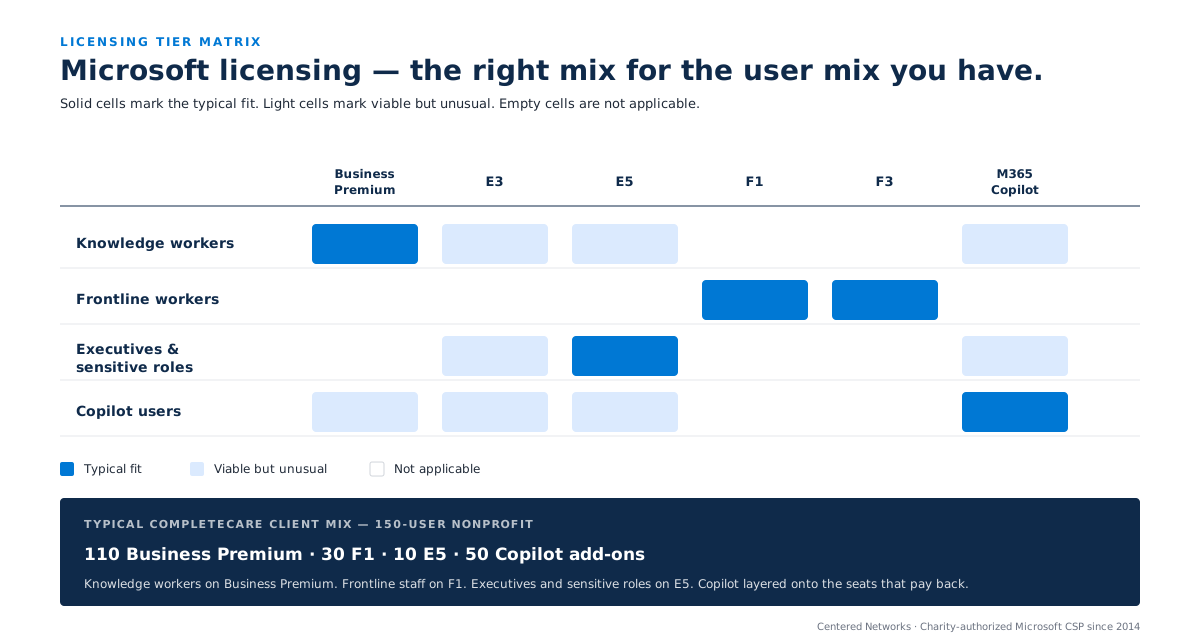
A typical CompleteCare client mix looks like this:

Knowledge workers

Microsoft 365 Business Premium or E3/E5

Business Premium is the most common. E3 or E5 when Microsoft Sentinel, advanced Purview, or Defender XDR P2 is required.

Frontline workers

Microsoft 365 F1 or F3

Kiosk-style users who do not need a full mailbox. F1 or F3 depending on the features required.

Executives and sensitive roles

E5 or E3 with add-on packs

When Microsoft Defender for Identity, Defender for Cloud Apps, Defender for Office 365 P2, or Insider Risk Management is in play.

Copilot users

Microsoft 365 Copilot per user

Added per user where governance is in place. This is CompleteCare Intelligence territory: licensing and governance happen together, not separately.

Microsoft licensing tier matrix, user archetype by SKU
A matrix mapping four user archetypes against six Microsoft 365 SKUs, showing typical fit and viable-but-unusual fit for each combination, with an example mix callout for a 150-user nonprofit.

We evaluate the mix during the 90-Day AI Roadmap or as part of CompleteCare Foundations onboarding and rebalance quarterly. License optimization typically saves clients 10 to 25% versus the licensing they walked in with.

Microsoft 365 E7

The Frontier Suite: everything bundled at $99 per user.

Microsoft 365 E7 bundles E5, Microsoft 365 Copilot, Entra Suite, and Agent 365 at $99 per user per month. It is the destination, not the starting point: it assumes the Copilot governance prerequisites and a clean identity model are already in place.

See how Frontier Transformation sequences the path to E7 →

Copilot Credits

The new line item: seats, plus usage.

For years, Microsoft AI was a per-seat cost: buy a Copilot license, use Copilot. That is changing. As Copilot starts doing real, long-running work through capabilities like Copilot Cowork, that work is metered separately through Copilot Credits. The per-user license stays the floor; usage is billed on top. Understanding this before you turn it on is the difference between a predictable budget and a surprise invoice.

The per-seat license still covers Copilot Chat, Copilot in the Office apps, and the built-in agents. Long-running work such as Copilot Cowork, and the work Copilot Studio agents perform, is metered on top through Copilot Credits, pooled at the tenant.

How we set budgets and controls for Copilot Credits →

Things to know before you change CSPs or apply for nonprofit licensing.

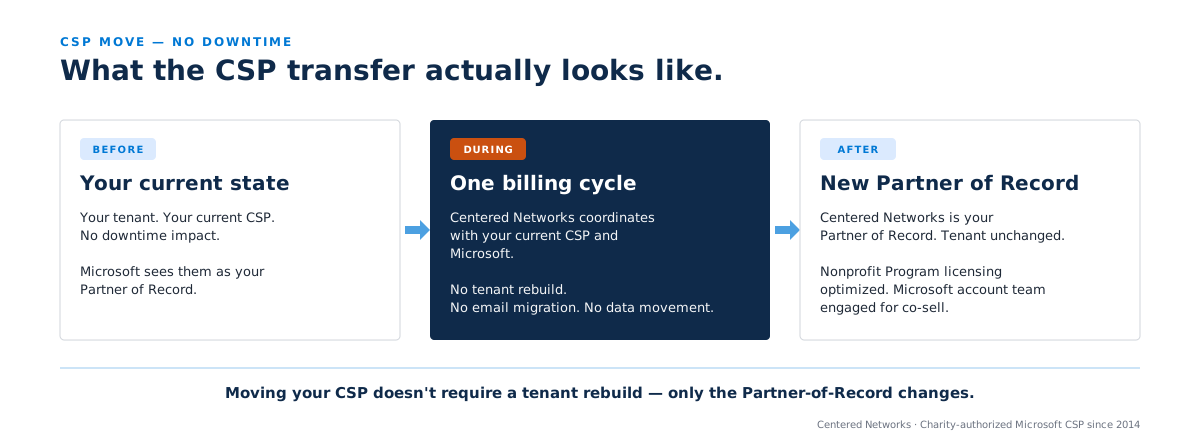
CSP transfer process, before, during, after
Three cards showing the CSP transfer process: before (existing CSP relationship), during (one-billing-cycle overlap coordinated by Centered Networks), and after (new Partner of Record with tenant unchanged).

Mission and eligibility

Not every 501(c)(3) qualifies. A small set of exclusion categories apply (some lobbying-oriented organizations, some organizations Microsoft Philanthropies excludes by policy). We screen during the eligibility check before you invest time in the process.

Grant licenses carry attestation requirements

Grant licenses (free or heavily discounted) come with attestation requirements you must maintain: primarily that the licenses are used only by employees of the eligible nonprofit, not by volunteers or external contractors. Misuse can void the grant. We track this on your behalf as part of the CSP relationship.

CSP authorization requirement

Not every CSP is authorized to sell nonprofit SKUs. Microsoft restricts the nonprofit SKUs to CSPs that have completed Microsoft's nonprofit partner authorization. Centered Networks has been authorized since 2014. Most CSPs your organization might already be with are not.

Microsoft 365 Copilot licensing

Microsoft 365 Copilot is sold per user as an add-on. Nonprofit pricing applies, but eligibility and SKU availability move with Microsoft’s program calendar. We keep the live picture. We also recommend deploying Copilot through CompleteCare Intelligence rather than purchasing licenses before governance is in place.

Our credentials

Twelve years operating nonprofit Microsoft tenants. Five Solutions Partner designations.

Authorized for Microsoft nonprofit licensing since 2014

Twelve years of operating nonprofit Microsoft 365 tenants, 60+ of them under management today. We have seen every grant-license edge case, every TechSoup validation path, and every CSP transition scenario. The authorization is current and verified by Microsoft.

Five Solutions Partner designations

Modern Work, Security, Infrastructure (Azure), Data and AI (Azure), Digital and App Innovation (Azure). All five are verified by Microsoft. The Modern Work and Security designations are directly relevant to every licensing engagement; the Azure designations matter when clients need cloud and licensing under one Partner of Record.

Rural Health Resiliency Program partner

Direct path for qualifying critical-access and rural hospitals to discounted licensing and free cybersecurity and cloud-capability assessments. We know the program mechanics and have run the eligibility path for hospital clients.

Licensing operated, not just sold

We are not a discount reseller. We operate the tenant alongside the licensing: CompleteCare Foundations, Govern, Intelligence, and Shield are the operational services that sit on top of the CSP relationship. Licensing is the start; operations is the sustained value.

One accountable Partner of Record

Microsoft’s account teams know to engage us on co-sell opportunities, grant placements, and solution-play motions for nonprofit clients. You get the Microsoft ecosystem working for you, not around you.

Microsoft Solutions Partner: Modern Work designation badge. Microsoft Solutions Partner: Security designation badge.

How it works

It’s the easiest Microsoft change you can make.

Five steps from your current CSP to an authorized Partner of Record with consolidated nonprofit pricing.

  1. 01

    Eligibility check

    We confirm your Microsoft Nonprofit Program eligibility (or Rural Health Resiliency Program if applicable) and identify the SKUs you qualify for. No commitment beyond the conversation.

  2. 02

    Mix optimization

    We model the right E3, Business Premium, E5, F1, and Copilot mix against your actual user roles. Most organizations find 10 to 25% savings in the first mix review.

  3. 03

    CSP relationship move

    We coordinate the move with your current CSP and Microsoft. One billing cycle of overlap is normal. The tenant stays where it is; only the Partner of Record changes.

  4. 04

    Licensing in operation

    From the next billing cycle, you are billed by Centered Networks on consolidated nonprofit pricing. Renewal cycles, license adds and removes, and SKU changes flow through us.

  5. 05

    Optional next step

    If you want the platform operated alongside the licensing, that is CompleteCare. Most clients move to CompleteCare Foundations as the natural next step within a quarter.

Frequently asked questions about Microsoft nonprofit licensing.

We already have a CSP. Is moving disruptive?

No. The tenant stays where it is. The Partner of Record changes. No downtime, no email migration, no rebuilds. One billing cycle of overlap is normal during the move.

Can any Microsoft partner place nonprofit licensing?

Microsoft restricts the nonprofit SKUs (grant-funded Business Basic, discounted Business Premium and E3/E5, Rural Health Resiliency Program pricing) to CSPs that have completed Microsoft’s nonprofit partner authorization. Most CSPs have not. Centered Networks has been authorized since 2014.

Do you only sell licensing, or do you also operate the tenant?

We do both, but they are separable. Licensing alone is a CSP relationship. Operation is CompleteCare (Foundations, Govern, Intelligence, and so on). Many clients start with licensing and graduate to CompleteCare Foundations within a quarter.

Can you help us through the TechSoup validation for the Microsoft Nonprofit Program?

Yes. TechSoup validation (or Microsoft’s direct verification, depending on country and current process) is part of the eligibility flow we handle. You do not need to navigate that path independently.

Do you handle Microsoft 365 Copilot licensing?

Yes. Copilot is sold per user as an add-on; nonprofit pricing applies. We typically deploy Copilot through CompleteCare Intelligence after Foundations is in place, so the licensing and the governance happen together rather than separately.

What about Azure?

We are a Microsoft Solutions Partner with three Azure designations (Infrastructure, Data and AI, Digital and App Innovation). Azure licensing and consumption can move under our CSP. Azure is operated through CompleteCare for custom application work and data platform engagements.

What are Copilot Credits, and how is usage-based billing different?

The Microsoft 365 Copilot license is a per-seat cost that covers everyday Copilot: Chat, Copilot in the Office apps, and built-in agents. When Copilot does heavier, long-running work through capabilities like Copilot Cowork, that work is metered separately through Copilot Credits, pooled at the tenant and bought pay-as-you-go at 0.01 US dollars per credit or prepaid at a 5 to 20 percent volume discount. As your CSP we consolidate the credits on your Microsoft invoice and set up the Cost Management controls so the spend stays predictable. See how we adopt and govern Copilot Cowork →

Talk to us about your Microsoft licensing.

Whether you are a new nonprofit just adopting Microsoft 365, a foundation rebalancing your license mix, or a rural hospital exploring the Resiliency Program, we will do the eligibility check, model the right mix, and move your CSP cleanly. No commitment beyond the conversation.

Or get your 90-Day AI Roadmap if you want licensing and platform operations reviewed together.

  • Authorized for Microsoft nonprofit licensing since 2014
  • No commitment to start
  • Up to 75% off for qualifying nonprofits
This field is required
Valid email required
This field is required

We use this to respond to you and to understand how visitors use our site. See our privacy policy.

Thanks, we’ve got it.

A senior member of our team will reply within one business day about your licensing situation.