Managed SOC on Microsoft Sentinel

24/7 security operations, without the SOC team.

Round-the-clock managed detection and response for nonprofits, foundations, and rural hospitals that need real security operations without standing up an in-house SOC.

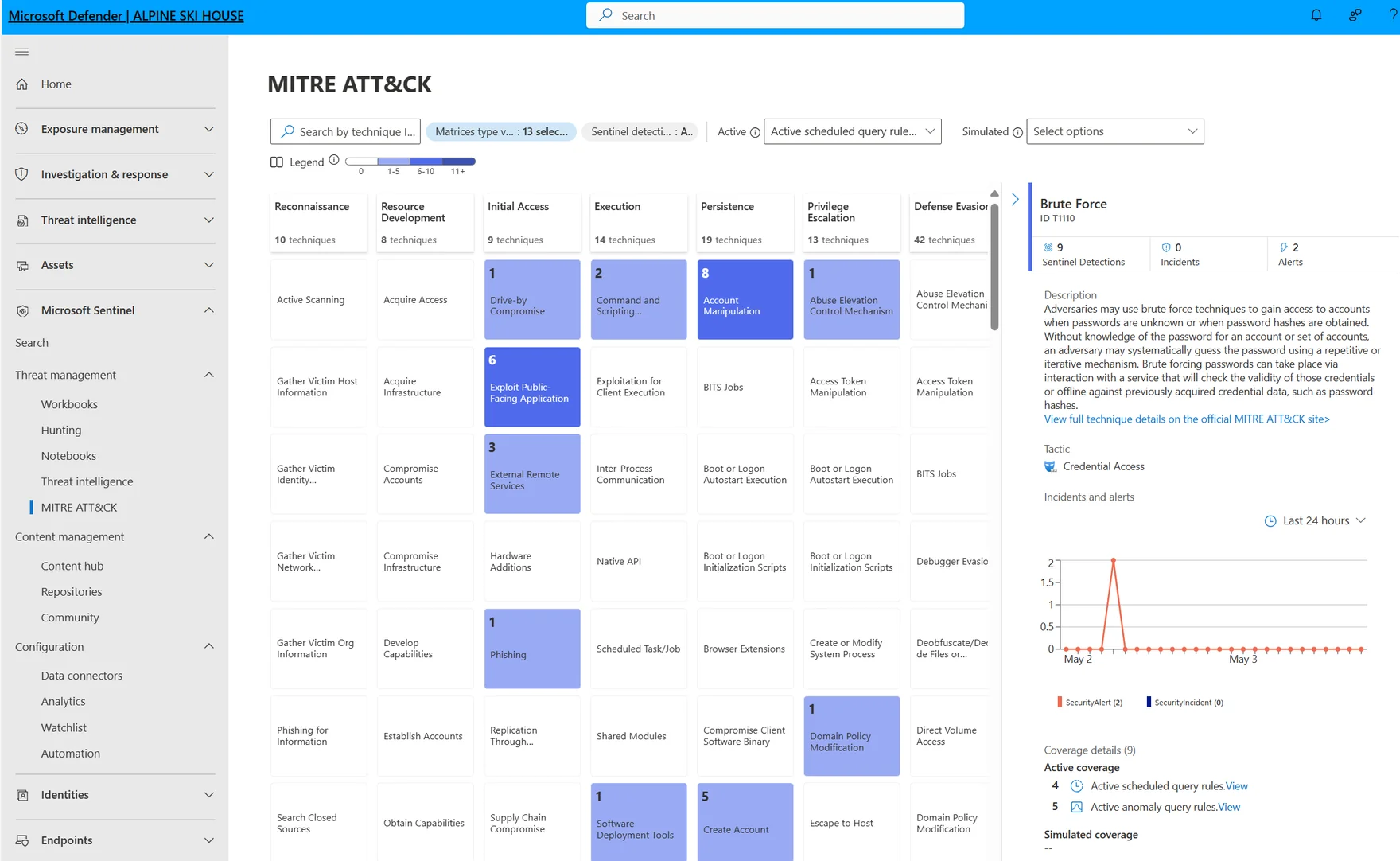
Microsoft Sentinel MITRE ATT&CK coverage view in the Microsoft Defender portal, with active and simulated indicator coverage across reconnaissance, resource development, initial access, execution, persistence, privilege escalation, and defense evasion tactics.

Why a managed SOC

You can’t hire a SOC team. You don’t need to.

A security operations center is not a tool you buy once. It is a function that has to be staffed every hour of every day, because attackers do not keep business hours. For a mission-driven organization with a lean IT team, standing that up in-house is not a budget line. It is a department.

A real 24/7 SOC needs 6 to 8 analysts to cover the clock, senior leadership to run it, the tooling to detect and respond, and threat-intelligence subscriptions to know what to look for. For any organization under 500 staff, the math does not work. A managed SOC does: you get the coverage, the analysts, and the tooling as a service, sized to an organization your size, and you keep your IT team focused on the work only they can do.

What’s included

A real SOC, delivered as a service.

Six functions, run continuously on Microsoft Sentinel. Each one is the proof that a managed SOC is a real SOC, not a dashboard with an alert email.

24/7 managed detection & response

Our SOC analysts watch your environment around the clock: triage, investigation, containment, and clear communication to your team when something matters. Every alert is reviewed by a human, and every incident has a documented timeline. Senior analysts handle every escalation, not three queues deep.

Threat hunting

Proactive hunts using custom KQL queries against your data, informed by current threat intelligence from Microsoft Threat Intelligence and sector-specific sources: H-ISAC for healthcare, sector ISACs for foundations and nonprofits. Hunting finds the activity that does not trip a rule.

Automated response (SOAR playbooks)

Microsoft Sentinel automation rules and Logic Apps playbooks that isolate compromised endpoints, disable accounts, and quarantine phishing email, without waiting on human escalation for the obvious actions. Every automated step is logged and reversible, so speed never costs you control.

AI workload monitoring

As you deploy Microsoft 365 Copilot and custom agents, the attack surface expands: prompt injection, agent over-permission, AI-channel data leakage. We extend SOC scope to cover Microsoft Agent 365 telemetry, paired with the governance baseline that keeps the data those agents touch under control.

Compliance evidence

Monthly reports for cyber-insurance renewals, HIPAA audits, board governance, and grant-funder requirements. The audit trail you actually need (incidents, response times, control coverage) is generated as a normal part of the service, rather than reconstructed under pressure before an audit.

Co-managed, not a black box

Your IT team retains full visibility into the Sentinel workspace, the analytics rules, and the playbooks. You can escalate, ask questions, or take work back at any time. We operate as an extension of your team, not a replacement for it.

AI on the watch floor. Our analysts run Microsoft Security Copilot, Microsoft’s generative-AI security product, inside the same Microsoft Defender and Microsoft Sentinel consoles they already work in. It summarizes a noisy incident in seconds, drafts the next investigation step, and turns a plain-language question into a Sentinel hunting query, so a lean co-managed team moves at senior-analyst speed. Every result is still reviewed by a person: Security Copilot runs as the signed-in analyst with no elevated privileges, and your data is never used to train foundation models. This is how we keep round-the-clock coverage affordable for an organization your size.

Why it matters now

Continuous monitoring stopped being optional.

For mission-driven organizations, the question is no longer whether to monitor around the clock. Three forces have already settled it.

HIPAA enforcement

For rural and critical-access hospitals, HIPAA and HITECH expectations now treat continuous monitoring and documented incident response as table stakes, not a quarterly log review. Regulators expect a timeline when something goes wrong, and a timeline has to be recorded as it happens.

Cyber-insurance underwriting

Cyber-insurance carriers now underwrite on security posture. Renewal questionnaires increasingly assume 24/7 detection and response and a documented incident-response capability. Without them, premiums rise, coverage narrows, or the policy is declined outright.

Grant-funder expectations

A growing share of grant funders now ask nonprofits and foundations for evidence of continuous monitoring and an incident-response plan. Sector ISACs set the baseline; H-ISAC does the same for healthcare. A managed SOC produces that evidence as a byproduct of normal operations.

How it works

From workspace to watch floor.

A managed SOC is only as good as the Sentinel environment underneath it. We build that environment first, then run it.

  1. 01

    Sentinel workspace design

    We stand up the Microsoft Sentinel workspace with a cost-conscious data-tier design across Analytics, Auxiliary, and Basic logs, so you monitor what matters without an unbounded ingestion bill.

  2. 02

    Data connectors

    We connect the sources that matter: Microsoft 365, Microsoft Entra ID, Microsoft Defender XDR, Azure, and your line-of-business applications, so the SOC sees the whole environment.

  3. 03

    Analytics rules, tuned

    We tune analytics rules to your environment, not a generic template. The goal is signal: alerts that mean something, with the false-positive noise pulled down so real incidents are not buried.

  4. 04

    SOAR playbooks

    We build Sentinel automation rules and Logic Apps playbooks for the obvious containment actions, so the response to a known-bad signal starts in seconds, with every step logged and reversible.

  5. 05

    The co-managed handoff

    We take the watch. Your team retains full visibility into the workspace, the rules, and the playbooks, and a senior analyst handles every escalation. You always know what we are seeing and why.

  6. 06

    Monthly compliance reporting

    Every month, we deliver the report your auditors, funders, and insurer expect: incidents, response times, and control coverage, recorded as the service runs rather than reconstructed before a deadline.

At a glance.

Questions

Frequently asked questions about Managed SOC on Microsoft Sentinel.

We already have a SIEM, an MDR provider, or a security tool we like. Do we have to replace it?

Often, no. Managed SOC on Microsoft Sentinel is built for organizations whose data, identity, and devices already sit inside Microsoft 365 and Azure, because that’s where the cleanest telemetry and the lowest ingestion cost live. If you have a working MDR contract or an EDR you want to keep, we’ll fold that signal into Sentinel through a connector rather than rip it out. We coexist with the tools that earn their place, and we tell you when one is doing duplicate work.

How do you keep Microsoft Sentinel ingestion costs from running away?

Sentinel cost is a design decision, not a surprise. We route data deliberately across the Analytics, Auxiliary, and Basic log tiers, so the high-signal sources land where they can be queried in real time and the verbose, long-retention sources land where storage is cheap. We monitor ingestion month over month, flag the noisy connectors, and tune them. You get continuous monitoring on a budget you can defend to a board.

Can a managed SOC actually see what Microsoft 365 Copilot and our agents are doing?

Yes, and it should. As you deploy Copilot and custom agents, the attack surface expands: prompt injection, agent over-permission, AI-channel data leakage. We extend SOC scope to Microsoft Agent 365 telemetry alongside the rest of your Microsoft 365 and Defender XDR signal, so AI workloads are monitored on the same watch floor as the rest of the environment. That monitoring is most useful when the governance baseline underneath it is sound, which is why we usually pair this with the CompleteCare Govern tier.

Will our IT team lose visibility into the Sentinel workspace?

No. This is co-managed, not a black box. Your team keeps full access to the Sentinel workspace, the analytics rules, the playbooks, and the incident history. You can escalate, ask questions, or take work back at any time. We operate as an extension of your team, not a replacement for it, and a senior analyst handles every escalation rather than routing you through tiered queues.

Will the monthly reporting actually satisfy our cyber-insurance carrier, HIPAA auditor, and grant funders?

That is what the reporting is for. Each month we deliver an evidence package built from the live workspace: incidents, response times, control coverage, and an audit trail recorded as the service runs rather than reconstructed under deadline. The format is built for cyber-insurance renewal questionnaires, HIPAA and HITECH audit requests, board reporting, and grant-funder security attestations. If your auditor or carrier wants a specific control framework cross-walk, we’ll add it.

Do we have to be on CompleteCare to buy a managed SOC?

No. Managed SOC on Microsoft Sentinel is available standalone and as an upgrade for existing CompleteCare clients. The two are complementary: CompleteCare runs the platform with operating discipline, and the managed SOC adds the 24/7 watch floor on top. The right starting point is usually a two-week Discovery Sprint, which scopes your environment, your compliance reality, and what continuous coverage should cover first.

Do you use AI in your SOC, and is our data safe?

Yes. Our analysts use Microsoft Security Copilot, Microsoft’s generative-AI security product, to summarize incidents, draft investigation steps, and generate Microsoft Sentinel hunting queries from a plain-language question. It is an accelerator for our team, not an autopilot: a person reviews every incident and approves every consequential action. On data, Security Copilot runs each query as the signed-in analyst with no elevated privileges, it stays inside your Microsoft tenant’s compliance boundary, and your data is not used to train Azure OpenAI foundation models. If you are licensed for Microsoft 365 E5 or E7, the Security Copilot capacity our analysts draw on is now included with that license.

Start a Discovery Sprint.

Two weeks of structured discovery scopes your environment, your compliance reality, and what 24/7 coverage should cover first. It is the right front door to a managed SOC engagement.

Already a CompleteCare client? Managed SOC is your upgrade path: see CompleteCare →

Building the broader security foundation? See Security & Governance →

This field is required
Valid email required
This field is required

Thank you!

We’ll be in touch within one business day to scope your Discovery Sprint.