Identity
Microsoft Entra, Conditional Access, multifactor authentication, privileged access, service identities, and least-privilege design.
Prepare
Microsoft Copilot (formerly Microsoft 365 Copilot) and agents inherit your identities, permissions, data access, sharing rules, and security posture. Centered Networks hardens and governs that foundation so AI starts from a controlled environment instead of magnifying existing gaps.
Three minutes, no email.
About two weeks, from $7,500.
Microsoft solution area: Security
The principle
AI can make good information easier to use. It can also make poor permissions, stale access, oversharing, and weak governance easier to scale.
That is why our AI work begins with the same questions our security and Microsoft operations teams already ask.
This is not a separate “security project” bolted onto AI. It is the load-bearing layer beneath it.
When permissions are cleaner,
Copilot retrieves from a more trustworthy information boundary.
When SharePoint is structured,
organizational knowledge becomes easier to ground.
When identities are governed,
agent actions can be scoped more precisely.
When sensitive data is labeled,
policies can follow the information instead of relying on user judgment alone.
When configuration is continuously managed,
AI readiness does not decay six months after the project ends.
Microsoft Entra, Conditional Access, multifactor authentication, privileged access, service identities, and least-privilege design.
Microsoft Intune, endpoint configuration, compliance policy, device health, patching, and secure access to organizational resources.
Microsoft Defender for Office 365, Teams, SharePoint, OneDrive, external sharing, and collaboration controls.
Microsoft Purview, sensitivity labels, DLP, retention, information protection, and the governance patterns that determine what AI can safely retrieve.
Microsoft Defender and the security controls that protect identities, endpoints, email, SaaS activity, and cloud workloads.
Baseline management, change control, exception handling, drift detection, documentation, and rollback discipline.
M365 InstantOn
Many organizations already license Microsoft 365 Business Premium: identity protection, device management, threat defense, and information governance included, but have never fully activated or operationalized those capabilities. M365 InstantOn is Centered Networks’ productized path for turning that unused license value into a hardened, continuously managed Microsoft 365 platform.
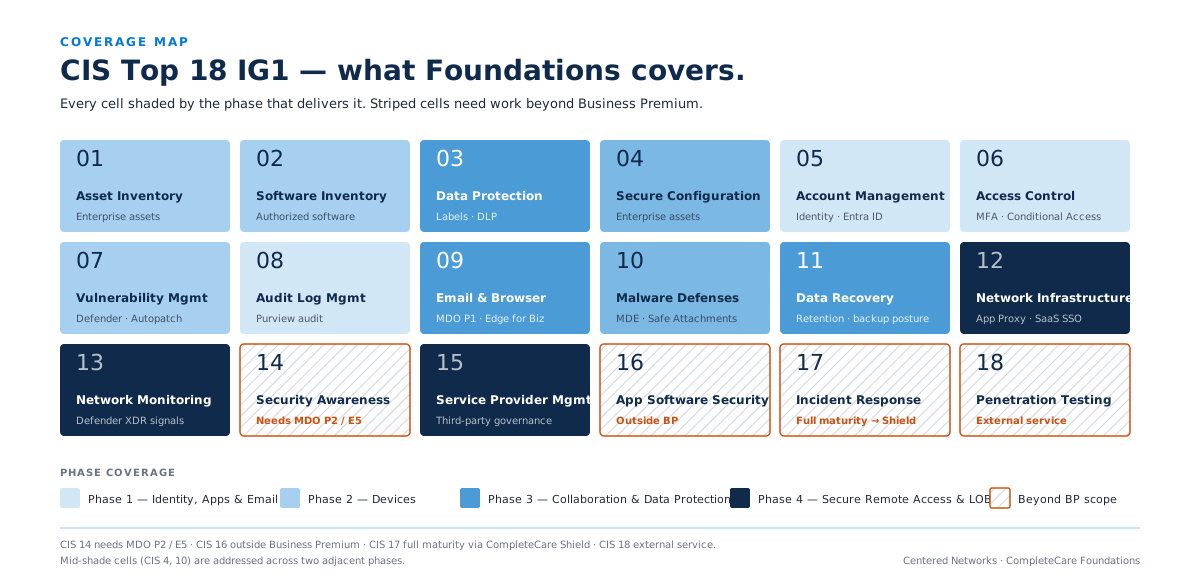
CIS Top 18 IG1, what CompleteCare Foundations covers
All eighteen controls, grouped by the Foundations phase that delivers them. The last group needs work beyond Business Premium.
1 Identity, apps, and email
CIS 05 Account Management (Entra ID), 06 Access Control (MFA, Conditional Access), 08 Audit Log Management (Purview audit), and the first part of 04 Secure Configuration.
2 Devices
CIS 01 Asset Inventory, 02 Software Inventory, 07 Vulnerability Management (Defender, Autopatch), the rest of 04 Secure Configuration, and the first part of 10 Malware Defenses.
3 Collaboration and data protection
CIS 03 Data Protection (labels, DLP), 09 Email and Browser Protections (Defender for Office 365 Plan 1, Edge for Business), 11 Data Recovery (retention and backup posture, partial), and the rest of 10 Malware Defenses.
4 Secure remote access and line-of-business apps
CIS 12 Network Infrastructure (App Proxy, SaaS single sign-on), 13 Network Monitoring (Defender XDR signals), and 15 Service Provider Management.
Beyond Business Premium
CIS 14 Security Awareness needs Defender for Office 365 Plan 2 or E5. CIS 16 Application Software Security is outside Business Premium. CIS 17 Incident Response reaches full maturity through CompleteCare Shield. CIS 18 Penetration Testing is an external service.
The outcome: the security and management capabilities you already pay for, actually running, configured to a documented baseline, monitored, and kept current as Microsoft evolves the platform. Current scope and details live on the service page.
Operating discipline
People join and leave. Vendors change. Microsoft adds capabilities. Applications request permissions. Teams create new sites. Policies accumulate exceptions. Centered Networks treats governance as an operating discipline, not a one-time project.
That creates a foundation that stays ready for the next Copilot, agent, or business process you want to introduce.
You want to address the security, data, and permission issues that will become more visible once AI is enabled.
Microsoft CopilotYou want the security and management capabilities in the license fully activated across identity, devices, email, collaboration, security, and data protection, then continuously operated.
See M365 InstantOnYou need a more defensible operating model for identity, data protection, access, and change management, with Microsoft Purview run as a working data-protection and compliance program.
See CompleteCare GovernCentered Networks can operate the Microsoft 365 layer (operations, reporting, roadmap, change management, and service ownership) while coexisting with other providers where the scope makes sense.
See CompleteCare FoundationsMicrosoft Solutions Partner with five designations, including Data & AI. We helped design and build the National Mall Gateway on Microsoft Azure for the Trust for the National Mall.


We will assess the environment, identify the highest-risk and highest-value gaps, and map the work required before Copilot or agents scale them.
The Finder takes three minutes and asks for no email. The Roadmap is a paid engagement of about two weeks.