Presales advisory
Requirements, fit-gap, and licensing, in plain language.
Business Central and Dynamics 365 · Agentify
Part of AI Agents & Automation
Advisory, deployment, and adoption for Business Central and Dynamics 365, with Copilot in Dynamics 365 and agents working in finance and operations from the start.
Three minutes. No email needed.
A short form. We reply within one business day.
Who it is for
Business Central covers finance and operations. It does not replace a donor CRM; it works alongside the one you already use.
Not the right fit if you only need email, files, and security: start with M365 InstantOn.
What you get
Requirements, fit-gap, and licensing, in plain language.
Business Central or Dynamics 365, configured for how you work.
From your current system, tested before cutover.
Copilot and agents handling reconciliations, approvals, and reporting prep, with people approving.
Added only where the fit-gap shows a need.
So your team can run it.
The advisory starts from $7,500, with the fixed fee in writing before you commit, and is credited in full toward the implementation if you proceed with us. Microsoft licensing is separate from the Centered Networks fee.
Microsoft programs may help fund or accelerate eligible engagements; eligibility is confirmed before scope.
How it works
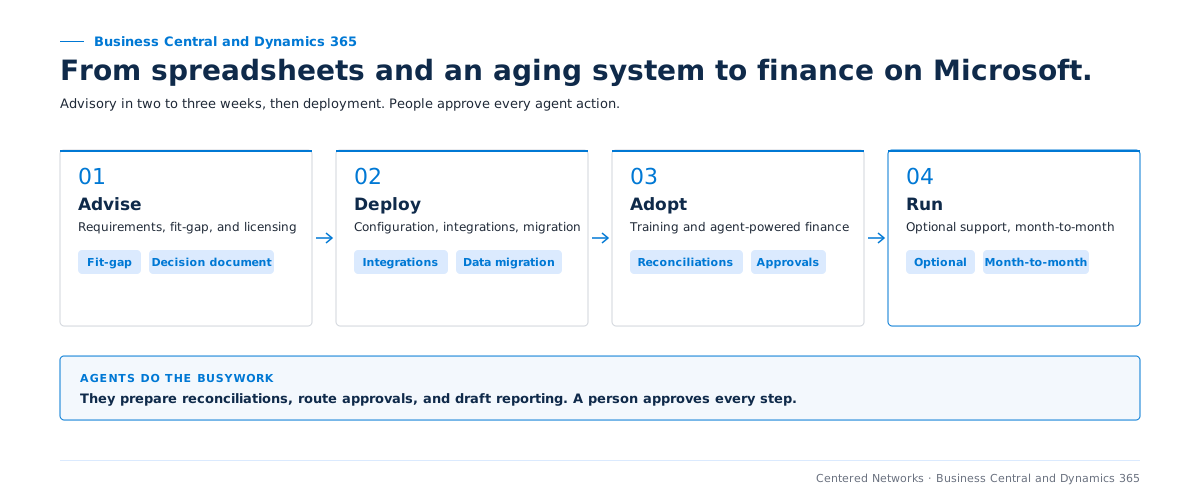
Deployment is scoped separately after the advisory decision.
Related engagements
Operate
Power Platform automation for the workflows around finance.
See CompleteCare Automate →Agentify
One governed production agent for a workflow outside finance.
See Agent Launchpad →Prepare
Put finance and program numbers in one governed place for the board.
See Data Estate Readiness Review →The advisory answers that with a fit-gap against your requirements before anything is deployed.
No. Data migration from your current system is part of the scope, the advisory sets how much history moves, and every migration is tested before cutover.
They prepare reconciliations, route approvals, and draft reporting. People review and approve every step.
Tell us what you run today for finance, CRM, or contact center, and what month-end looks like. We start with the advisory and confirm scope before kickoff.
Not sure this is the first move? Take the three-minute Opportunity Finder (no email needed), or see the paid 90-Day AI Roadmap.
In business since 2004, serving nonprofits and mission-driven organizations the entire time.
A senior member of our team will reach out within one business day to confirm scope and next steps.