01
Use Case Discovery Workshop
Structured assessment across operations: finance, fundraising, programs, HR, IT. Output: a documented opportunity inventory prioritized by hours-saved and feasibility. Delivered by Week 2.
Power Platform managed services for nonprofits: governed Power Automate, Power Apps, and Copilot Studio agents. The 5-Stage Automation Maturity Path™ for mission-driven organizations, deployed under a Power Platform Center of Excellence. Built on the licensing you already pay for. Month-to-month, or scoped as a fixed-fee project. Your call.
Microsoft Solutions Partner · Business Applications · FY26: Innovate with AI in Low Code · 5-Stage Automation Maturity Path™ · No-Lock-In Promise™
Foundations recommended, not required. Power Platform sits adjacent to the Microsoft 365 tenant. We strongly recommend pairing Automate with CompleteCare Foundations for tenant-level identity and connector governance, but Power Platform deployments can stand on their own if you already have an equivalent baseline. We will tell you in Discovery which path is right.
The operational tax
Donor receipting handled in spreadsheets. Volunteer onboarding via email chains. Grant tracking in shared documents. Approval workflows via reply-all threads. Every one of these manual processes is a tax on the same staff you are already asking to do more: more program work, more fundraising, more reporting.
The funding environment is not going to deliver more headcount. And the workload keeps growing.
The structural answer is to automate the workflows that do not need a human in the loop, and you are already paying for the platform that can do it.
Microsoft research is consistent here: the gap between licensing Power Platform and using it productively is where most mid-sized mission-driven organizations sit today. Either Power Automate sits dormant in the tenant, or staff figure it out unsupervised and shadow IT compounds: flows running on personal credentials, connectors talking to consumer services, no version control, no rollback, no audit. When the staff member leaves, the flow breaks silently.
There is a structured way through. That is CompleteCare Automate.
Built on the licensing you already pay for. Governed from day one.
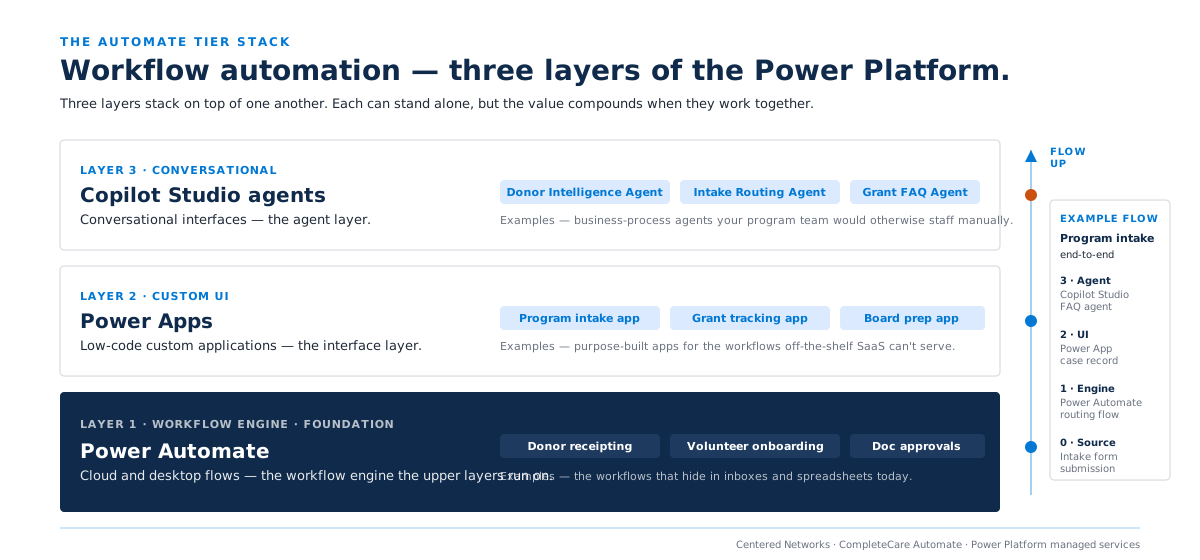
CompleteCare Automate is the Power Platform tier of the CompleteCare stack: Microsoft's Power Automate, Power Apps, and Copilot Studio agents, delivered with the Center of Excellence governance that turns Power Platform from a shadow-IT generator into a governed operations capability.
1
Spreadsheets, email chains, reply-all approvals. Power Platform licensing present but unused.
How Automate delivers: Use Case Discovery Workshop. Opportunity inventory prioritized by impact and feasibility.
2
Two or three production flows handling priority workflows.
How Automate delivers: First and second production automations live by end of Kickoff.
3
Environment strategy, DLP for connectors, role-based access, deployment lifecycle, monitoring.
How Automate delivers: Power Platform CoE Starter Kit deployed; admin operating cadence in place.
4
Ten-plus active flows and apps across departments. Citizen developers operating safely under CoE.
How Automate delivers: Monthly Enhancement Pod cadence; Quarterly Automation Portfolio Review; hours-saved tracking.
5
Copilot Studio agents handling conversational business processes alongside flows.
How Automate delivers: Copilot Studio Agent Builds; agent lifecycle; integration with broader agent governance.
Most CompleteCare Automate clients reach Stage 3 within 6 months and Stage 4 within 12. Stage 5 unfolds as the first conversational use case lands: typically a grant-inquiry handler, an intake-triage agent, or an FAQ agent your program team is tired of staffing manually.
What is delivered
01
Structured assessment across operations: finance, fundraising, programs, HR, IT. Output: a documented opportunity inventory prioritized by hours-saved and feasibility. Delivered by Week 2.
02
Center of Excellence Starter Kit deployment; Dev/Test/Prod environments; Data Loss Prevention policies for connectors; role-based access; solution-based Application Lifecycle Management.
03
Design, build, test, deploy. Typical first builds: donor-receipting flow, volunteer-onboarding app, expense-approval workflow.
04
Same lifecycle. Two production automations live by end of Kickoff is the deliverable bar.
05
First business-process agent: FAQ handler, intake-routing agent, document-approval router, or grant-inquiry response agent. See our AI practice for broader context.
06
Role-based training for makers, approvers, and end users. Quick-reference guides, video walkthroughs, adoption documentation pack.
07
Recurring 20-hour engineering pod for net-new flow builds, agent refinement, connector additions, and governance updates.
08
Inventory of active flows, apps, and agents; hours-saved calculation; usage and error telemetry; identified next-build opportunities. Board-ready.
09
Connector-classification policies (Business / Non-Business / Blocked). Maintained as Microsoft adds new connectors and as your inventory evolves.
10
Per-automation telemetry: invocations, success rate, average runtime saved, user feedback. The data that makes the Portfolio Review defensible.
Both produce production automations on the same platform under the same Center of Excellence. What differs is the operating model after launch.
Option A · Recommended for most
Kickoff Project plus Monthly Retainer plus Enhancement Pods. A 6 to 10 week Kickoff Project delivers the Discovery Workshop, CoE governance, two production automations, the first Copilot Studio agent, training, and adoption metrics. After Kickoff, the Monthly Retainer maintains the CoE, monitors the portfolio, runs adoption interventions, and tracks Microsoft platform changes.
What you get in the Kickoff
The No-Lock-In Promise™
Month-to-month. No 12-month contract. No termination fee. 30 days' notice to cancel. The structural commitment is on us.
Option B · One-time scoped
Same delivery team, same methodology, same components, packaged as a fixed-fee project with defined scope, milestones, and acceptance criteria. Typical engagement: Discovery plus CoE Setup plus two production automations plus one Copilot Studio agent plus training. Project ends at acceptance; no recurring retainer.
Right for you if
Project SOW terms
Fixed-fee, milestone-based, with a defined acceptance process. Discovery is sized as a discrete fixed-fee engagement that produces the opportunity inventory and refined build estimate. You see what we would build and what it would cost before committing to the full Kickoff.
Most clients choose the managed service, because Power Platform is a portfolio asset: the value compounds as new automations get built across departments. A Project SOW is the right call when you have a defined set of automations, a Power Platform-capable team internally, and want our help shipping a discrete wave.
Investment
Option A · Managed service
50 to 150 user band. Pricing scales for larger tenants.
| Kickoff Project | $20,000 one-time |
|---|---|
| Monthly Retainer | $1,500 / month |
| Enhancement Pod (20 hrs) | $4,500 each |
| Power Platform licensing | Client-procured (often bundled with Microsoft 365) |
Year 1 base: $38,000. Most clients add 3 to 6 Enhancement Pods ($13,500 to $27,000) as new use cases emerge. A 250-user engagement is typically $25,000 Kickoff plus $2,000 monthly.
Option B · Project SOW
Fixed-fee, scoped at Discovery. Typical engagement: CoE plus two automations plus one agent plus training.
| Typical fixed fee | $30,000 to $50,000 |
|---|---|
| Pricing driver | Integration complexity |
| Monthly commitment | None |
| Re-engagement | Per-pod or new project, no penalty |
Scope defined at Discovery. You see what we would build and what it would cost before committing to the full project.
Risk reversal
01
Month-to-month. No 12-month contract. No termination fee. If you do not see value any month, you give 30 days' notice and walk away. No penalty. No data held hostage. The structural commitment is on us.
We stand behind this because Power Platform governance should create value that compounds over time. If it is not compounding, you should be able to leave. Most clients stay because the hours-saved data makes the retainer self-evidently worth it.
02
Discovery is sized as a discrete fixed-fee engagement that produces the opportunity inventory and a refined build estimate. You see what we would build and what it would cost before committing to the full Kickoff. If the estimate does not make sense for your organization, you walk away with the inventory and no further obligation.
This applies to both engagement models. Whether you start with the managed service path or the Project SOW path, the first engagement is always scoped Discovery. No surprises at the end of a free discovery call.
03
From the moment automations go live, we track per-automation telemetry: invocations, success rate, and average runtime saved per invocation. Every Quarterly Portfolio Review includes a board-ready hours-saved report. If the data does not show reclaimed staff capacity, we tell you, and we fix it before billing the next Enhancement Pod.
The 30 to 50 hours per week reclaimed is not a marketing claim: it is the Stage 3 outcome we track for every client. We publish the methodology, so you can verify the math.
In practice
Donor receipting and grant tracking ran entirely on spreadsheets and email. Discovery Workshop surfaced 11 automatable workflows. The Kickoff delivered two production automations (donor-receipt flow and volunteer-onboarding app) and the first intake-routing Copilot Studio agent within 10 weeks. By Month 6 (Stage 3), the team had reclaimed 34 hours per week across four departments.
“The hours-saved report made the case to our board without us having to argue for the investment. The data spoke for itself.”
Operations DirectorRepresentative client profile
Grant approval workflows were handled via reply-all email threads, with no audit trail. CompleteCare Automate replaced the approval chain with a governed Power Automate flow, integrated with SharePoint for document routing. Within 12 months the foundation had 14 active flows and two Copilot Studio agents across program and finance functions. Staff reported 45 hours per week reclaimed at the 12-month portfolio review.
“Our auditors were impressed that every approval had a timestamped audit trail in SharePoint. That was a bonus we did not expect.”
Program DirectorRepresentative client profile
Came in through the Project SOW path with a defined set of three automations and a Power Platform-capable internal developer. The fixed-scope engagement delivered CoE governance, three production automations, and one Copilot Studio FAQ agent. Re-engaged six months later for a second wave of five automations as new use cases surfaced during the Quarterly Portfolio Review cadence they maintained internally.
“We came in skeptical about whether we needed CoE governance for three automations. By Month 4, we were very glad we had it.”
IT DirectorRepresentative client profile
Productized agents
CompleteCare Automate builds bespoke Copilot Studio agents as part of the tier. For organizations that want a faster path to Stage 5, Agent Kits are productized agents with defined scope, known integration points, and transparent pricing. They run on the same Power Platform infrastructure Automate governs.
Microsoft technologies included
Questions
Power Platform is Microsoft's low-code platform (Power Automate, Power Apps, Copilot Studio). CompleteCare Automate is the managed service that deploys it with Center of Excellence governance, builds the production automations, runs the portfolio review, and operates the agents. Microsoft sells the licensing; we make it actually produce reclaimed staff capacity.
No. Automate is one of the tiers that can stand alone. Power Platform sits adjacent to the Microsoft 365 tenant, so the hard prerequisite that applies to Intelligence and Shield does not apply here. We strongly recommend Foundations because connector governance is more durable when it sits on top of strong identity and tenant baseline. If you have an equivalent baseline, or you want Automate to be your entry point, we will tell you honestly in Discovery whether you are ready.
No. Power BI dashboards and Microsoft Fabric data work are a separate tier: CompleteCare Insight. Automate is workflow automation: Power Automate flows, Power Apps low-code applications, and Copilot Studio business-process agents. The data those dashboards run on often comes from Automate flows.
Microsoft 365 Copilot is conversational AI inside the Office apps: drafting emails, summarizing meetings, querying documents. That is CompleteCare Intelligence, a different tier. Automate's Copilot Studio agents are scoped as business-process agents (FAQ handlers, intake routing, approval routers): workflow automation, not knowledge work. The tiers stack cleanly.
A fixed-fee, scope-defined engagement that delivers the Discovery Workshop, CoE governance, two production automations, the first Copilot Studio agent, and training. Same components as the managed Kickoff, packaged with milestones and an acceptance process. Typical price: $30,000 to $50,000 depending on integration complexity. No recurring retainer afterward; re-engage per pod or as a new project without a relationship penalty.
Use Case Discovery Workshop output delivered Week 2. CoE governance live Week 4. First Production Automation in pilot Week 6. Second Production Automation live by Week 10. Hours-saved telemetry begins as soon as automations go live.
Short term, yes. Automating a process requires staff to articulate how the process actually runs, which usually surfaces the workarounds nobody talks about. Long term, most clients reclaim 30 to 50 hours per week of staff capacity across the organization by Stage 3. That is the equivalent of an unfunded mid-level hire.
Yes. Automate maps to the Microsoft FY26 Business Applications solution play Innovate with AI in Low Code. Centered Networks is positioned as the named partner for Power Platform enablement and Copilot Studio business-process agent deployment for mission-driven organizations. Co-sell registration is established at engagement signing; Microsoft Marketing Development Fund opportunities exist for joint go-to-market with Microsoft Business Applications field teams.
CompleteCare is a seven-tier stack. Automate is one tier. Other tiers your team will hear about:
CompleteCare · Tier 01
Microsoft 365 Business Premium baseline, anchored to CIS IG1. The recommended pairing for Automate.
CompleteCare Foundations →
CompleteCare · Tier 04
Microsoft Fabric data platform. Automate flows often write back into the lakehouse Insight builds.
CompleteCare Insight →
CompleteCare · Tier 06
Microsoft 365 Copilot and Copilot Studio at the program level. Automate's agents are the workflow layer; Intelligence is the organizational Copilot program.
CompleteCare Intelligence →
CompleteCare
Seven tiers, one governed platform. See how the full CompleteCare architecture fits together.
See the full CompleteCare stack →
60 minutes. We walk through your top workflows and tell you what is automatable, and what is not worth automating, before you commit to anything.
If we agree it is a fit, we scope Discovery as a discrete fixed-fee engagement. You see the opportunity inventory and build estimate before committing to the full Kickoff. If it is not a fit, you walk away with the inventory and no further obligation.
Prefer a fixed-scope project? Tell us on the form and we will route you to the Project SOW path. Not ready for Discovery? Email us at sales@centerednetworks.com and we will point you toward something useful, even if it is not us.
A senior member of our team will reply within one business day to set up your automation discovery session.