Stage 4 of the Centered AI Practice · Managed Intelligence Provider

Agents that get better every month, not just stay live.

Managed AgentOps is the ongoing operations discipline for organizations with agents already running in production. Monitoring, drift detection, governance refresh, FinOps, and proactive use-case development on a documented monthly cadence. Per-agent-per-month pricing. Month-to-month.

Microsoft 5x Solutions Partner, including Data and AI Microsoft AI Operations partner-eligible play Built on Microsoft Agent 365 Observe / Govern / Secure Month-to-month: 30 days’ notice, no minimum after engagement starts

Four-stage Centered AI Practice staircase with Managed AgentOps highlighted in burnt orange as the recurring Stage 4, showing per-agent-per-month pricing and the No-Shadow-AI-Drift Promise guarantee.

Managed AgentOps requires at least one production agent already deployed. This is structural, not a sales construct: there is nothing to operate if there is nothing in production. Most customers arrive at AgentOps having just completed Stage 2 (Agent Launchpad) or Stage 3 (Frontier Transformation). If you do not have agents in production yet, the right starting point is the Centered AI Quickstart or Agent Launchpad, not this page.

Production agents are not a deployment problem. They are an operations problem.

Two-by-two quadrant showing the four ways production AI agents decay without active operations: prompt drift, model drift, governance erosion, and shadow AI re-emergence, each paired with the AgentOps workstream that addresses it.

The pattern across every organization that has shipped its first Copilot Studio agent is the same. Month one, the agent works. Month three, the prompts are stale. Month six, a Microsoft model update has shifted the agent’s behavior in ways nobody documented. Month twelve, governance has eroded because nobody owns the quarterly review, shadow AI has begun re-emerging because the sanctioned agent stopped feeling fresh, and the board’s AI ROI question has gone from “show us the wins” to “are we sure this is still working?”

Four failure modes show up over and over.

Failure mode 01

Prompt drift

The prompt library that shipped on Day 1 was tuned against Day 1 user behavior. By Month 6, users are asking different questions, the agent is producing weaker answers, and nobody has updated the library because nobody owns it.

Failure mode 02

Model drift

Microsoft updates the underlying models on its own cadence. When the model shifts, every agent’s behavior shifts: sometimes in subtle ways that don’t trip an alert but visibly degrade the user experience.

Failure mode 03

Governance erosion

Responsible AI policies, content safety filters, and data-access boundaries set up at launch are not self-maintaining. New SharePoint sites get created, new sensitive content categories emerge, new staff join, and the governance posture drifts from the deployment-day baseline.

Failure mode 04

Shadow AI re-emergence

The whole point of deploying a sanctioned agent was to give staff a governed alternative to unsanctioned tools. If the sanctioned agent stops feeling fresh, those tools come back: and the donor records, grant material, board minutes, and PHI start walking out again.

Managed AgentOps is a recurring operations discipline, not a check-in.

Ten workstreams, documented cadence

What AgentOps covers every month.

Ten named workstreams, each tied to a documented cadence and a named deliverable. Nothing in this list is aspirational: every item is a real piece of work the M365 Managed Services team performs every month on every agent.

  1. 01

    Agent performance monitoring Continuous instrumentation of every production agent using the Copilot Studio Agents Report and Microsoft Agent 365 analytics. Usage, latency, completion rates, escalation rates, and end-user satisfaction tracked against the Month-1 baseline. Weekly automated sweep plus monthly reviewed analysis, documented in the runbook your organization owns under the Open Repo Promise.
  2. 02

    Prompt library curation Every agent has a prompt library. That library is a living artifact. The M365 Managed Services team reviews and tunes prompts monthly based on actual usage patterns, weak-answer reports, and new business workflows. Prompt patterns that emerge across the broader Centered Networks customer base propagate to your library on a quarterly cadence.
  3. 03

    Model lifecycle management When Microsoft updates the model underlying Copilot or Copilot Studio, your agents are regression-tested against a documented evaluation suite before the update influences production behavior. Where a model update degrades agent performance for your use cases, we coordinate the rollback or mitigation pattern with Microsoft.
  4. 04

    Governance evolution review Monthly review of Responsible AI policies, content safety filters, data-access governance, and Entra Agent ID configuration. Sensitivity-label propagation audited. New SharePoint sites and Microsoft Teams channels assessed for agent-access implications. The Microsoft Agent 365 registry kept current.
  5. 05

    Shadow AI scan Monthly review of Defender for Cloud Apps unsanctioned-app detections, Microsoft Purview Insider Risk Insights signals, and anomalous DLP events. If shadow-AI usage of sensitive content categories trends above the Month-1 baseline, the No-Shadow-AI-Drift Promise applies.
  6. 06

    FinOps for AI Token consumption tracked per agent. Model selection optimized: the cheapest model that meets the quality bar wins, every time. Cost-per-outcome calculated for each agent against its named KPI (hours saved, cases routed, donor outreach personalized, claims denials reduced). AI spend the board can interrogate.
  7. 07

    KPI dashboard A Power BI dashboard built against your Agent 365 analytics and Copilot Studio Agents Report, customized to your agents and your KPIs. The dashboard lives in your tenant and continues to update at steady state. Available to the executive sponsor and the AI program lead on demand; refreshed monthly with commentary.
  8. 08

    Monthly Value Brief A written deliverable, not a slide. Three to five pages, sent to the executive sponsor monthly. What changed in the past 30 days. What the agents produced. What we tuned, what we caught, what we recommend next. Designed so the executive can forward it to the board chair without rewriting.
  9. 09

    Quarterly AI ROI and Risk Review A board-ready readout every quarter. Adoption metrics, productivity outcomes, FinOps reporting, risk posture, agentic roadmap, new use-case recommendations. Designed for the board cybersecurity-and-AI agenda item.
  10. 10

    New use-case development One to two new agent proposals per quarter, sourced from cross-customer pattern intelligence and from observed friction in your workflows. Each proposal is scoped with a named owner, named workflow, estimated effort band, and expected KPI impact. The executive sponsor decides whether to advance, defer, or decline.

Delivery cadence

What you receive and when.

Concentric four-band wheel showing the AgentOps operating rhythm: weekly automated telemetry at center, monthly Value Brief and governance deliverables, quarterly board-ready review and new use-case proposals, and as-needed model regression and incident response at the outer band.

Every week (automated)

  • Agent performance telemetry refresh
  • Shadow AI signal sweep (Defender for Cloud Apps, Purview Insider Risk)
  • FinOps consumption snapshot

Every month (M365 Managed Services team delivers)

  • Monthly Value Brief: 3 to 5 page written deliverable for the executive sponsor
  • Agent KPI dashboard refresh with commentary
  • Governance evolution review: what changed, what we tuned, what we recommend
  • Shadow AI scan results against the No-Shadow-AI-Drift Promise baseline
  • Prompt library updates pushed to production
  • FinOps reconciliation: actual vs. projected, with optimization recommendations

Every quarter (board-ready)

  • Quarterly AI ROI and Risk Review: written report plus 60-minute executive readout
  • New use-case proposal package (1 to 2 agents)
  • Cross-customer pattern propagation report: what we learned from the CompleteCare customer base and applied to your environment
  • Microsoft platform roadmap brief: what’s coming from Microsoft and what it means for your agents

As needed

  • Microsoft model-update regression test (whenever Microsoft ships a model change)
  • Incident response if an agent behavior degrades or a governance signal trips

Per-agent-per-month pricing

Priced on complexity. Transparent on the Microsoft fee.

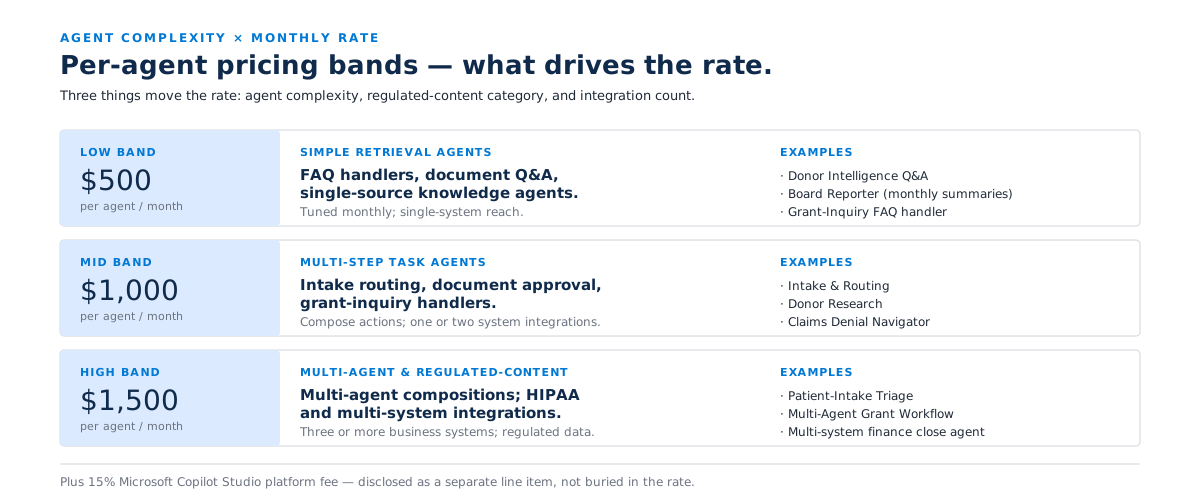
A per-agent-per-month rate based on agent complexity, plus 15% of your monthly Microsoft Copilot Studio consumption, disclosed as a separate line item.

Three-band matrix showing Managed AgentOps monthly pricing: $500 per agent for simple retrieval agents, $1,000 for multi-step task agents, and $1,500 for multi-agent compositions and regulated-content agents, plus a 15% Copilot Studio platform fee.
Managed AgentOps per-agent-per-month pricing by agent complexity tier.
Agent complexity Monthly rate per agent Representative agents
Low band: simple retrieval agents $500 FAQ handlers, document Q&A, single-source knowledge agents. The Donor Intelligence Q&A agent or the Board Reporter agent drafting standard monthly summaries from Microsoft 365 data.
Mid band: multi-step task agents $1,000 Intake routing, document approval, grant-inquiry handlers, donor research, claims denial navigation. Agents that compose multiple Copilot Studio actions and integrate with one or two business systems.
High band: multi-agent compositions $1,500 Planner/critic/executor patterns, agents that trigger other agents, agents integrated with three or more business systems, agents handling HIPAA or regulated content categories.

Plus 15% Microsoft platform fee

15% of your monthly Microsoft Copilot Studio consumption is added to the invoice as a separate line item. This is the Premium Engagement Credit on Copilot Studio consumption that Microsoft makes available to AI Operations partners. It is disclosed transparently, not buried in the per-agent rate.

Example A

Small foundation, three agents

Three low-band agents: a Donor Intelligence Q&A agent, a Grant-Inquiry FAQ handler, a Board Reporter agent.

3 agents at $500 each = $1,500 per month. Plus 15% of Copilot Studio consumption (typically $200 to $400 per month at this footprint).

Total monthly invoice: $1,700 to $1,900. Annual cost: $20,000 to $23,000.

Example B

Mid-sized nonprofit, eight agents

Two low-band agents, five mid-band agents, one high-band agent: (2 × $500) + (5 × $1,000) + (1 × $1,500) = $7,500 per month.

Plus 15% of Copilot Studio consumption (typically $800 to $1,500 per month at this volume).

Total monthly invoice: $8,300 to $9,000. Annual cost: $100,000 to $108,000.

What is not included

  • Microsoft licensing: Microsoft 365 Copilot, Copilot Studio, and Microsoft Agent 365 licensing is client-procured directly from Microsoft. Nonprofit pricing (75% Microsoft Nonprofit Program discount) applies where eligible.
  • Major new agent builds beyond the one to two per quarter new-use-case development cadence. Net-new agents are scoped as Intelligence Pods ($4,500 each) or a new Agent Launchpad engagement, depending on scope.
  • Stage 3 platform uplifts. If your organization advances to Microsoft 365 E7 or Frontier Suite mid-engagement, that is a Centered Frontier Transformation engagement scoped separately.

Structural guarantees

Three guarantees. Written into the SOW, not the marketing.

Every offer in the Centered AI Practice ladder carries three structural guarantees. Managed AgentOps is no exception.

Three guarantee cards for Managed AgentOps Stage 4: the No-Shadow-AI-Drift Promise, the Open Repo Promise, and the 14-Day Diagnostic Promise, each with its structural commitment stated.

01

The No-Shadow-AI-Drift Promise

If shadow-AI usage of sensitive content categories, measured via Defender for Cloud Apps unsanctioned-app detections, Microsoft Purview Insider Risk Insights signals, and anomalous DLP events, trends above your Month-1 baseline for two consecutive months, the M365 Managed Services team includes targeted shadow-AI remediation work in that month’s retainer at no additional cost, and continues to include it every month until the trend reverses.

Your organization is structurally protected against the failure mode that wrecks most production agent deployments. The No-Shadow-AI-Drift Promise is why the shadow AI scan is not aspirational: it is the instrument that triggers the guarantee.

02

The Open Repo Promise

Every artifact the M365 Managed Services team produces or tunes, including Copilot Studio agent definitions, prompt library entries, Power Platform connector configurations, governance policies, Responsible AI documentation, KPI dashboards, runbooks, and regression test suites, lives in your Microsoft 365 tenant under your ownership. We do not hold customer agents hostage in a Centered Networks tenant. If you leave the engagement, you keep every artifact you paid for, ready to run.

Combined with the month-to-month commercial structure, this means you can exit on 30 days’ notice with everything intact and operating. Any partner can pick up where we left off, or your own team can.

03

The Quarterly Frontier Forward Promise

Every quarter, the M365 Managed Services team delivers at least one, and typically two, new agent proposals sourced from cross-customer pattern intelligence and from observed friction in your workflows. Each proposal is scoped with a named owner, named workflow, estimated effort band, and expected KPI impact. If a quarter passes without at least one proposal landing on the executive sponsor’s desk, the next month’s retainer is waived.

This is the structural guarantee that AgentOps is not just “we’ll check on your agents sometimes.” The engagement is forward-leaning by contract, not by goodwill.

Who this is built for.

A clean fit

  • Organizations that just completed Centered Agent Launchpad with one or two agents in production and want the operations discipline before the agents drift
  • Organizations that just completed Centered Frontier Transformation with three to five agents live and want a named operator for the recurring AgentOps work
  • Organizations with three or more production agents currently running informally through a stretched IT director or a contractor with no documented cadence
  • Leadership teams that have already realized production agents are an operations problem, not a deployment problem, and want their AI getting better every month

Sweet spot: 3 to 12 production agents. Below 3, most organizations are better served by an Intelligence Pod or a broader CompleteCare Intelligence engagement. Above 12, the engagement is custom-scoped during the Readiness call.

Not the right starting point if

  • Your organization has zero agents in production. There is nothing to operate. Start with the Centered AI Quickstart for a 90-day roadmap, then Agent Launchpad to put the first agent in production
  • Your organization is running production agents without CompleteCare Intelligence (or equivalent) underneath. AgentOps built on top of ungoverned Copilot tenant infrastructure is built on sand
  • Your IT organization already has dedicated agent operators, an AgentOps runbook, and a documented monthly cadence. Managed AgentOps is a complete operations discipline, sold as a complete discipline, not as point-solution coverage

In practice

What this looks like in practice.

Community foundation, 50 to 150 staff

Arrived at AgentOps six weeks after Agent Launchpad completed, with a Donor Intelligence Q&A agent and a Board Reporter agent in production. Month 1 baseline established across both agents. By Month 4, prompt library had been updated three times based on actual usage. Shadow AI signals stayed flat against the baseline. The executive director now forwards the Monthly Value Brief to the board finance committee without modification.

“We shipped two agents. The question we were dreading was ‘how do we know they’re still working in six months?’ AgentOps is the answer to that question.”

Executive DirectorRepresentative client profile

Rural critical-access hospital, 200 to 400 staff

Entered AgentOps at Stage 4 having completed Frontier Transformation, with three agents in production including a Patient-Intake Triage agent handling HIPAA-regulated content. High-band pricing applied for the regulated content workload. Model regression testing ran twice in the first six months when Microsoft updated the underlying Copilot Studio model. Neither update was allowed into production without clearance. Governance posture maintained at the Frontier Transformation baseline throughout.

“HIPAA doesn’t stop at deployment. AgentOps is how we keep the compliance posture from decaying after the project closes.”

CIORepresentative client profile

Workforce development nonprofit, 100 to 250 staff

Eight agents at engagement start: two low-band, five mid-band, one high-band multi-agent composition. Quarterly Frontier Forward Promise delivered two new agent proposals in Q1 (a grant-inquiry routing agent and a case-worker documentation assistant). Both advanced to scoped Agent Launchpad engagements. Shadow AI signals tripped in Month 5; remediation work was included in that month’s retainer per the No-Shadow-AI-Drift Promise. Trend reversed by Month 7.

“Month 5 would have been the month everything quietly went wrong. The No-Shadow-AI-Drift Promise is what caught it. And the remediation was in the bill we were already paying.”

COORepresentative client profile

The Centered AI Practice

Stage 4 of a four-stage ladder.

Managed AgentOps is the only stage that is recurring, month-to-month, and explicitly designed to be where the customer relationship lives long-term. Stage 3 is not a prerequisite for Stage 4.

Branching flowchart showing two routes into Managed AgentOps: the common path via Stage 2 Agent Launchpad, and the accelerated path via Stage 3 Frontier Transformation, both converging at recurring month-to-month Stage 4 AgentOps.

The common path

Stage 1 (Quickstart) to Stage 2 (Agent Launchpad) to Stage 4 (Managed AgentOps). Most mid-band mission-driven organizations graduate from Stage 2 directly into AgentOps once their first agent is in production. Stage 3 is optional and tends to come later in the relationship, when the organization is ready for the full Microsoft Frontier stack.

The accelerated path

Stage 1 to Stage 3 (Frontier Transformation) to Stage 4. Organizations with the strategic commitment and the budget to go straight to a 90-day Frontier engagement land in AgentOps with three to five agents on Day 91. The AgentOps cadence is the steady state after the 90-day inflection.

See the full AI Practice ladder →

Microsoft alignment

Built on the Microsoft Agent 365 control plane.

Managed AgentOps is built explicitly on Microsoft’s Agent 365 control plane and aligned to Microsoft’s FY26 AI Operations partner-eligible play.

Control plane

Microsoft Agent 365: Observe / Govern / Secure

AgentOps operationalizes all three pillars on the customer’s behalf. Observe: agent registry, agent-to-data mapping, analytics dashboards, role-specific oversight. Govern: lifecycle management, policy enforcement, Responsible AI documentation, audit trail. Secure: Entra Agent ID for agent identity, content safety, threat protection, data-access governance.

Partner program

AI Operations partner-eligible play

Microsoft’s FY26 partner program names AI Operations as a partner-eligible service category in the Copilot + Agents at Work and Secure AI Productivity solution plays. The 15% Premium Engagement Credit kicker on Copilot Studio consumption is the Microsoft-side commercial mechanism for partners delivering this category, which is why our pricing surfaces it as a transparent line item.

Native instrumentation

Microsoft-native monitoring, no third-party stack

The monitoring, drift detection, and KPI dashboard workstreams use Microsoft-native instrumentation: Copilot Studio Agents Report and Microsoft Agent 365 analytics. We do not bolt on a third-party AgentOps platform. Your dashboards live in your Microsoft tenant. This is structurally required under the Open Repo Promise.

  • Microsoft Solutions Partner for Data and AI
  • Microsoft Solutions Partner for Modern Work
  • Microsoft Solutions Partner for Security
  • AI Operations partner-eligible play
  • Microsoft Agent 365 Observe / Govern / Secure
  • See the full credential map →

Questions

Frequently asked questions.

How is Managed AgentOps different from CompleteCare Intelligence?

Intelligence is the broader managed-Copilot program: governance setup, first-wave deployment, prompt library, training, the full stack of work that takes an organization from “we licensed Copilot” to “we run Copilot as a governed program.” Managed AgentOps is the subset of Intelligence focused specifically on the operations discipline for production agents. Most customers run both: the Intelligence tier on the Copilot program, the AgentOps engagement on the agents that ship into it. They are priced and scoped separately so customers with smaller agent footprints are not paying for what they do not need.

What if we have a smaller agent footprint, say one or two agents?

For one or two agents, the per-agent overhead is meaningful relative to the agent count. The honest recommendation is usually to run AgentOps inside a broader CompleteCare Intelligence engagement rather than as a standalone AgentOps engagement. Once the agent count crosses three, the dedicated AgentOps engagement starts to make sense. We will tell you which is right during the 30-minute Readiness call: there is no upsell pressure to start AgentOps before it earns its keep.

Do we have to use Centered Networks to run AgentOps?

No. The Open Repo Promise means every artifact lives in your tenant under your ownership. You can run AgentOps internally if you have the engineering capacity, the dashboard discipline, and the cross-customer pattern intelligence to do so. Most mission-driven IT teams cannot staff this internally, but if yours can, you do not need us. We are not the right partner for organizations that have already built an internal AgentOps team.

Can we run AgentOps ourselves, even partially?

Yes. The engagement supports a co-managed pattern. Some customers handle the agent KPI dashboard reviews internally and hand off the prompt curation, model regression, and shadow-AI work to the M365 Managed Services team. Others do the inverse. The Monthly Value Brief and the Quarterly AI ROI and Risk Review are always team deliverables: that is where the cross-customer pattern intelligence and the board-ready framing come in. Scope the co-managed split during the Readiness call.

What happens if an agent goes wrong?

“Goes wrong” usually means one of three things: a Microsoft model update has degraded the agent’s behavior, a governance signal has tripped, or end-user satisfaction has dropped against the Month-1 baseline. Each has a documented response runbook. Model-update regression: we roll back to the previous behavior or apply the mitigation pattern and brief the executive sponsor. Governance trip: incident response per the No-Shadow-AI-Drift Promise. Satisfaction drop: we tune the prompt library, the workflow integration, or the agent definition. Agent deprecation happens, and saying so up front matters: not every agent that ships is the right agent forever.

What is the minimum agent count?

There is no formal minimum, but the practical floor is three production agents. Below three, the economics tilt toward absorbing AgentOps into the broader Intelligence tier engagement. We will give you a straight answer on which path makes sense during the Readiness call.

Do we have to be on Stage 3 (Frontier Transformation) to use AgentOps?

No. Most customers arrive at AgentOps having completed Stage 2 (Agent Launchpad) with one or two agents in production, and never need Stage 3. Stage 3 is the right move when the organization is ready for the full Microsoft Frontier stack: Microsoft 365 E7, Microsoft Agent 365 at full scope, multi-agent orchestration, an AI Center of Excellence. AgentOps is the recurring service for everyone with agents in production, regardless of whether they entered through Stage 2 or Stage 3.

How does the 15% Microsoft platform fee work in practice?

Your monthly Microsoft Copilot Studio consumption is reported through the Microsoft Partner Center. The 15% Premium Engagement Credit is added to your monthly Centered Networks invoice as a separate line item. If your Copilot Studio consumption is $1,000 in a given month, $150 is added to that month’s AgentOps invoice. The kicker is disclosed transparently, not bundled into the per-agent rate. This is the Microsoft-side commercial mechanism for partners delivering the AI Operations partner-eligible play.

No-Lock-In Promise brand mark with Communication Blue rule lines and a 30-day exit chip, reinforcing the month-to-month, no-minimum-term commitment for Managed AgentOps.

Schedule a 30-minute AgentOps Readiness call.

We walk through your current production-agent footprint, your existing governance posture, the operations cadence you are running today, and we tell you whether Managed AgentOps is the right next step: or whether something else needs to happen first.

If we agree AgentOps is the right fit, the engagement begins on the first of the following month with a documented Month-1 baseline. From the day the engagement starts, the No-Shadow-AI-Drift Promise, the Open Repo Promise, and the Quarterly Frontier Forward Promise apply.

Prefer to read the broader program first? See CompleteCare Intelligence →
See where AgentOps fits: View the AI Practice ladder →

This field is required
Valid email required
This field is required

Thanks, we’ve got it.

A senior member of the M365 Managed Services team will reply within one business day to schedule your AgentOps Readiness call.

The Readiness call is a no-cost conversation. If we agree AgentOps is the right fit, the engagement begins on the first of the following month with a documented Month-1 baseline. If we agree it is not, we will point you toward what should happen first: an Agent Launchpad if you do not have agents yet, or a CompleteCare Intelligence engagement if the governance foundation needs to be set first.