Copilot prompts for nonprofits · by role
Copilot prompts for every nonprofit role
One hundred prompts, twenty for each of the five roles that carry most nonprofit work. Each one names a real task, the app it runs in, and the words to type. Copy one, swap in your own details, and see what Microsoft Copilot (formerly Microsoft 365 Copilot) does with documents you already have.
Written by Centered Networks · Microsoft facts checked on Microsoft Learn, October 13, 2026
Grounded in your work
Works from your work, not the open web.
With a Microsoft Copilot license, Copilot works from your organization's own material. Copilot Chat, included with Microsoft 365, works from the web and what you paste or upload, and in Outlook it can also see your inbox and calendar.
-
Your files With a license
Word documents, Excel workbooks, and decks stored in SharePoint and OneDrive.
-
Your email and chats With a license
Outlook threads and the Teams chats you're part of.
-
Your meetings With a license
Recaps of transcribed Teams meetings: what was decided and who agreed to do what.
-
Your permissions Always
It only sees what you can already open, with or without a license.
Why these prompts work
Copilot is useful in proportion to what it can see.
A consumer AI app knows the public web and whatever you paste into it. Microsoft Copilot can work from your organization's own material, inside the protections your Microsoft 365 already has. That is what lets a prompt say "this budget workbook" or "my email from the past two weeks."
Included, no extra cost
Microsoft Copilot Chat
- For eligible Microsoft 365 work accounts, including Business Basic, Standard, and Premium.
- Grounded in the web and in what you paste or upload.
- In Outlook, it can also answer questions about your inbox, calendar, and meetings.
- Runs agents built from instructions and public websites at no extra charge, including the five CN role agents, which you can later ground in your own work.
Paid, per user
Microsoft Copilot license
- Reasons across the email, meetings, calendars, chats, files, and sites you have permission to open.
- Copilot inside Word, Excel, PowerPoint, Outlook, and Teams, with priority access.
- Teams meeting recaps (with transcription on).
- Opens the door to Copilot Cowork for long, multi-step jobs, billed separately by usage in Copilot Credits.
Every prompt on these pages is tagged with the app it runs in. Without a license, upload or paste the document into Copilot Chat and ask the same thing. Prompts tagged Copilot app or Teams need the license to reach your own mail and meetings. See Microsoft licensing for nonprofits for prices and eligibility.
How to start
Three prompts for anyone, on day one.
Open Copilot Chat, paste or upload something you're working on, and try one. Then check the answer against the original. Copilot drafts; a person decides.
-
1Get to the point of a long document
Try:
Summarize this document in five bullet points. Then list the three questions a board member is most likely to ask about it.
-
2Tighten an email without changing the facts
Try:
Here is my draft email. Make it shorter and warmer, and keep every name, date, and dollar amount exactly as I wrote it.
-
3Turn notes into next steps
Try:
Turn these meeting notes into two lists: decisions we made, and action items with an owner and a due date for each.
Five roles
Pick your role. Twenty prompts each, with a one-page version to share.
-
Executive directors
Twenty prompts across board and governance, running the organization, funders, partners, and the public, planning ahead.
Role agent: ED Support by CN
-
Development directors
Twenty prompts across know your donors, appeals and thank‑yous, major gifts and campaigns, reporting to the board and team.
Role agent: Development Director by CN
-
Grants managers
Twenty prompts across choose what to apply for, write the proposal, compliance after the award, reports and renewals.
Role agent: Grants Manager by CN
-
Program managers
Twenty prompts across design the program, keep delivery on track, measure outcomes, report to funders and partners.
Role agent: Program Manager by CN
-
Communications teams
Twenty prompts across plan and publish, stories and impact, media and public moments, brand and consistency.
Role agent: Nonprofit Comms by CN
The one-page version
Fifteen prompts, five roles, one page.
Microsoft Copilot for nonprofits
Copilot prompts for every nonprofit role
Five roles. Fifteen prompts to try this week.
Works from your work, not the open web.
With a Microsoft Copilot license. Copilot Chat alone uses the web and what you paste or upload.
Your files
Documents and workbooks in SharePoint and OneDrive
Your email and chats
Outlook mail and Teams conversations
Your meetings
Teams recaps and who agreed to what
Your permissions
Only what you can already open
-
Word
Check a policy against the bylaws
Try: Compare this draft whistleblower policy with our bylaws and employee handbook. List any conflicts, gaps, or terms that don't match, with section numbers.
-
Copilot app
Find the commitments you've made
Try: Look across my email, Teams chats, and meetings from the past two weeks. List the commitments I made, who I made them to, and which ones are now overdue.
-
Word
Write the emergency succession plan
Try: Draft an emergency succession plan for the executive director role from our bylaws and org chart: who steps in, what authority they hold, and who tells funders and staff.
-
Excel
See who gave more, less, or stopped
Try: In this gift export, group donors by giving level and show who increased, decreased, or stopped giving compared with last year. Add a column for the date of each donor's last gift.
-
Outlook
Thank a first-time donor
Try: Write a thank-you email for a first gift of $500 to our literacy program. Say in plain terms what the gift supports and invite them to our family reading night.
-
PowerPoint
Build a naming-gift proposal
Try: Build a five-slide proposal for a $50,000 naming gift for our new classroom: the need, the plan, what the recognition includes, and the timeline.
-
Word
Reduce an RFP to one page
Try: Summarize this request for proposals on one page: eligibility, deadline, award range, match requirement, required attachments, and how proposals are scored.
-
Excel
Explain every budget line
Try: Write the budget narrative for this workbook. For each line, explain what it pays for and how it connects to the project activities.
-
Excel
Check spending against the approved budget
Try: Compare spending to date in this workbook with the approved grant budget. Show the percent spent by line and flag any line likely to overspend.
-
Word
Draft the logic model
Try: Using this program description, draft a logic model table with inputs, activities, outputs, short-term outcomes, and long-term outcomes.
-
Excel
Catch attendance drops early
Try: From this attendance workbook, show weekly attendance by site and flag any site where attendance fell three weeks in a row.
-
Forms
Build a pre and post survey
Try: Create a pre- and post-program survey for parents with eight questions about their child's reading at home, using a five-point scale.
-
Word
Turn a program update into a newsletter story
Try: Turn this program update into a newsletter story of about 300 words, plus a subject line and a 20-word teaser for social media.
-
Word
Write a story from an interview
Try: From this interview transcript, draft a 400-word story about a program graduate. Use only what she said, keep her words in quotes, and mark anything that needs her approval.
-
Word
Have a holding statement ready
Try: Draft a holding statement about a service disruption at our east site: what happened, what families should do, and when we'll update next. Calm and factual.
Copilot drafts; a person checks every name, number, and fact. Keep individual case, health, and student records out of prompts, and follow your organization's AI and data policies.

Centered Networks
Microsoft Solutions Partner





All 100 prompts centerednetworks.com/copilot-for-nonprofits/
Download the one-page PDF Download the image (PNG)
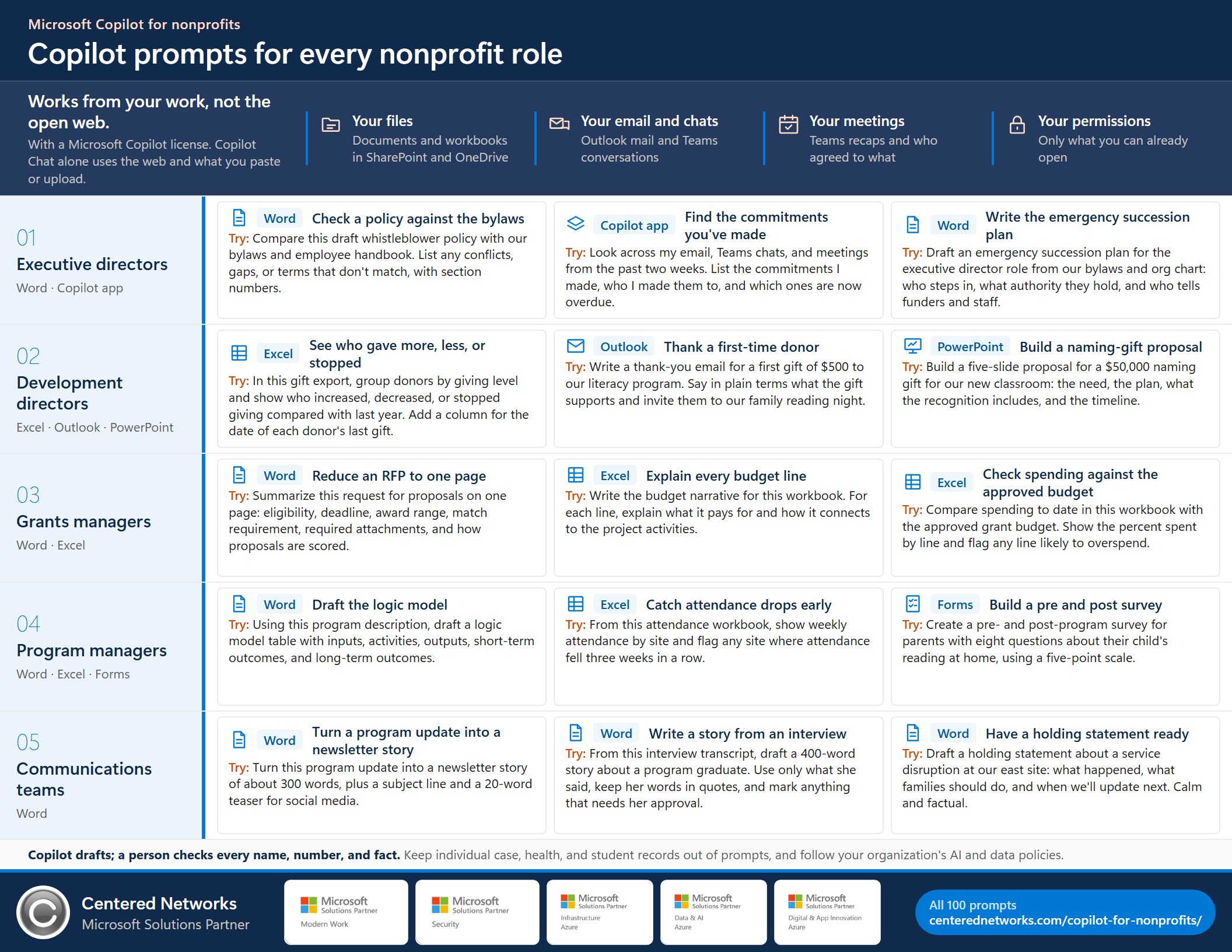
Copilot prompts for every nonprofit role, one page. Letter size, landscape. Share it with your team.
Where to go from here
Start with a role agent. Ground it in your own work. Then let a governed team carry the routine load.
-
1 · Start
A role agent in Copilot Chat
One agent per role, built for nonprofit work. They run in the Copilot Chat that comes with Microsoft 365 and draft only, so your team can try the work before you ground it in your own files.
Request the role agents -
2 · Ground it
Copilot Kickstart
A governed four-week Microsoft Copilot pilot: readiness checks, role-based scenarios, training, and a written expansion decision. Microsoft licensing is separate. Need help with licenses first? Start with nonprofit licensing.
See Copilot Kickstart → -
3 · Operate
The nonprofit AI operating system
A governed team of role agents on your own Microsoft 365, so you get more done with the team you have and the knowledge stays when people leave. One approval inbox for the executive director. Being built with founding partners.
See the AI operating system →
Questions
Copilot Chat, licenses, and safety.
What is the difference between Copilot Chat and Microsoft Copilot?
Microsoft Copilot Chat is included at no extra cost for eligible Microsoft 365 work accounts. It is grounded in the web and in what you paste or upload, and in Outlook it can also answer questions about your inbox, calendar, and meetings. Microsoft Copilot (formerly Microsoft 365 Copilot) is a paid per-user license that reasons across the email, meetings, chats, files, and sites you have permission to open, and adds Copilot inside Word, Excel, PowerPoint, Outlook, and Teams.
Is Copilot Chat included with our Microsoft 365?
Copilot Chat is included at no extra cost with eligible Microsoft 365 plans, including Business Basic, Business Standard, and Business Premium, for users who sign in with a work account. Agents that work only from their instructions and public websites carry no extra charge; agents that read shared organizational data are billed by usage.
What is Copilot Cowork, and do we need it?
Copilot Cowork carries out longer, multi-step jobs, such as assembling several documents at once. It requires a Microsoft Copilot license and usage-based billing in Copilot Credits that your administrator turns on and can limit by user or group. Most nonprofits get value from Copilot Chat and the licensed Copilot first.
Will Copilot show me files I'm not supposed to see?
No. Copilot respects your existing Microsoft 365 permissions and only reads content you are already allowed to open. That also means it can surface a file that was shared too widely, so check your sharing settings before a broad rollout.
Does Copilot summarize Teams meetings automatically?
Meeting recaps need transcription turned on, and the full intelligent recap needs a Microsoft Copilot or Teams Premium license. Without them, paste or upload your own notes and ask Copilot to turn them into decisions and action items.
Can we share these prompts?
Yes. Centered Networks wrote them for nonprofit teams. Copy them, change the details to fit your work, and share the page or the one-page PDF.
Sources for the Microsoft facts on this page
Checked on Microsoft Learn on October 13, 2026. Microsoft changes names, features, and licensing often; confirm in your Microsoft 365 admin center before you plan a rollout.
- Overview of Microsoft Copilot Chat (grounding, permissions, Chat versus licensed Copilot)
- Manage Microsoft Copilot Chat (eligibility, the 2026 name change)
- License options for Microsoft Copilot (web-based and work-based chat)
- Using agents in Microsoft Copilot Chat (which agents cost extra)
- Intelligent recap for Teams calls and meetings (license and transcription)
- Get started with Copilot Cowork (prerequisites)
- Manage Copilot Cowork for your organization (usage-based billing and limits)
All prompts on this page are written by Centered Networks. Copy them, adapt them, and share them with your team.