Copilot prompts for nonprofits · Program managers
Copilot prompts for nonprofit program managers
You run the work the mission is measured by, and you write a lot of it down. These twenty prompts use Microsoft Copilot (formerly Microsoft 365 Copilot) on your plans, attendance data, survey results, and meetings, so the paperwork moves faster and more of your week goes to participants and staff.
Written by Centered Networks · Microsoft facts checked on Microsoft Learn, October 13, 2026
Grounded in your work
Works from your work, not the open web.
With a Microsoft Copilot license, Copilot works from your organization's own material. Copilot Chat, included with Microsoft 365, works from the web and what you paste or upload, and in Outlook it can also see your inbox and calendar.
-
Your files With a license
Word documents, Excel workbooks, and decks stored in SharePoint and OneDrive.
-
Your email and chats With a license
Outlook threads and the Teams chats you're part of.
-
Your meetings With a license
Recaps of transcribed Teams meetings: what was decided and who agreed to do what.
-
Your permissions Always
It only sees what you can already open, with or without a license.
New to Copilot?
Start with these three.
Each one works today in Copilot Chat, which comes with eligible Microsoft 365 plans: upload or paste the document first, then ask. With a Microsoft Copilot license, run the same prompt inside Word or Excel on the file itself.
-
Draft the logic model
Try:
Using this program description, draft a logic model table with inputs, activities, outputs, short-term outcomes, and long-term outcomes.
-
Compare results by site and age
Try:
In this outcomes workbook, compare pre- and post-test scores by site and age group, and chart the average change for each.
-
Update a partner school
Try:
Draft a monthly update for our partner school's principal: what we did, attendance, one success story told without names, and what's next.
Design the program
-
Word
Draft the logic model
Try:
Using this program description, draft a logic model table with inputs, activities, outputs, short-term outcomes, and long-term outcomes.
-
Word
Write the participant handbook
Try:
Draft a participant handbook for our summer jobs program from the staff manual and last year's FAQ. Write it at a sixth-grade reading level.
-
PowerPoint
Train new volunteer tutors
Try:
Create a training deck for new volunteer tutors from our tutoring guide: our approach, a typical session, safety rules, and who to call with questions.
-
Excel
Staff the next session
Try:
Build a staffing plan for the fall session from this enrollment forecast: tutors needed per site per week at one tutor for every six students.
-
Word
Write a one-page pilot plan
Try:
From the notes of our design meetings, write a one-page pilot plan with goals, timeline, who does what, and how we will decide whether to continue.
Keep delivery on track
-
Teams
Track open action items
Try:
List the action items from our last three site coordinator meetings with the owner and date, and mark which ones are still open.
-
Outlook
Triage the site leads' email
Try:
Summarize this week's email from our three site leads: issues raised, supplies requested, and anything that needs my answer today.
-
Excel
Catch attendance drops early
Try:
From this attendance workbook, show weekly attendance by site and flag any site where attendance fell three weeks in a row.
-
Word
Update a partner school
Try:
Draft a monthly update for our partner school's principal: what we did, attendance, one success story told without names, and what's next.
-
Teams
Explain a process change to staff
Try:
Draft a post for our program team channel explaining the new sign-in process step by step, and what to do if the tablet isn't working.
Measure outcomes
-
Forms
Build a pre and post survey
Try:
Create a pre- and post-program survey for parents with eight questions about their child's reading at home, using a five-point scale.
-
Excel
Compare results by site and age
Try:
In this outcomes workbook, compare pre- and post-test scores by site and age group, and chart the average change for each.
-
Word
Read the survey comments
Try:
Summarize what this year's open-ended survey comments say about what participants valued and what frustrated them, with a few representative quotes.
-
PowerPoint
Show the committee what changed
Try:
Turn this outcomes workbook into five slides for our program committee, with one chart per outcome and a plain-language takeaway on each.
-
Excel
Clean a survey export
Try:
Clean up this survey export: remove duplicate responses, standardize the site names, and add a column that groups ages into bands.
Report to funders and partners
-
Word
Draft the quarterly program report
Try:
Draft the program section of our quarterly report to the county from this outcomes summary, following the contract's reporting template.
-
Word
Prepare for a site visit
Try:
Prepare an agenda and a one-page program overview for next Tuesday's foundation site visit, using our program plan and latest outcomes.
-
Copilot app
Keep your story consistent
Try:
Pull together what we've told this funder this year in emails and reports, so I can check that our next report is consistent with what we've said.
-
Word
Make the case for a second site
Try:
Write a one-page case for expanding to a second site from our waitlist numbers, outcomes, and cost per participant.
-
Outlook
Thank a host partner
Try:
Draft a thank-you email to our partner library after this semester, listing what their space made possible and asking to confirm spring dates.
The one-page version
Twelve of the twenty, on one page you can pin up or pass along.
Microsoft Copilot for nonprofits
Copilot prompts for program managers
Four kinds of work. Twelve prompts to try this week.
Works from your work, not the open web.
With a Microsoft Copilot license. Copilot Chat alone uses the web and what you paste or upload.
Your files
Documents and workbooks in SharePoint and OneDrive
Your email and chats
Outlook mail and Teams conversations
Your meetings
Teams recaps and who agreed to what
Your permissions
Only what you can already open
-
Word
Draft the logic model
Try: Using this program description, draft a logic model table with inputs, activities, outputs, short-term outcomes, and long-term outcomes.
-
PowerPoint
Train new volunteer tutors
Try: Create a training deck for new volunteer tutors from our tutoring guide: our approach, a typical session, safety rules, and who to call with questions.
-
Excel
Staff the next session
Try: Build a staffing plan for the fall session from this enrollment forecast: tutors needed per site per week at one tutor for every six students.
-
Teams
Track open action items
Try: List the action items from our last three site coordinator meetings with the owner and date, and mark which ones are still open.
-
Excel
Catch attendance drops early
Try: From this attendance workbook, show weekly attendance by site and flag any site where attendance fell three weeks in a row.
-
Word
Update a partner school
Try: Draft a monthly update for our partner school's principal: what we did, attendance, one success story told without names, and what's next.
-
Forms
Build a pre and post survey
Try: Create a pre- and post-program survey for parents with eight questions about their child's reading at home, using a five-point scale.
-
Excel
Compare results by site and age
Try: In this outcomes workbook, compare pre- and post-test scores by site and age group, and chart the average change for each.
-
PowerPoint
Show the committee what changed
Try: Turn this outcomes workbook into five slides for our program committee, with one chart per outcome and a plain-language takeaway on each.
-
Word
Draft the quarterly program report
Try: Draft the program section of our quarterly report to the county from this outcomes summary, following the contract's reporting template.
-
Word
Prepare for a site visit
Try: Prepare an agenda and a one-page program overview for next Tuesday's foundation site visit, using our program plan and latest outcomes.
-
Word
Make the case for a second site
Try: Write a one-page case for expanding to a second site from our waitlist numbers, outcomes, and cost per participant.
Copilot drafts; a person checks every name, number, and fact. Keep individual case, health, and student records out of prompts, and follow your organization's AI and data policies.

Centered Networks
Microsoft Solutions Partner





All 100 prompts centerednetworks.com/copilot-for-nonprofits/
Download the one-page PDF Download the image (PNG)
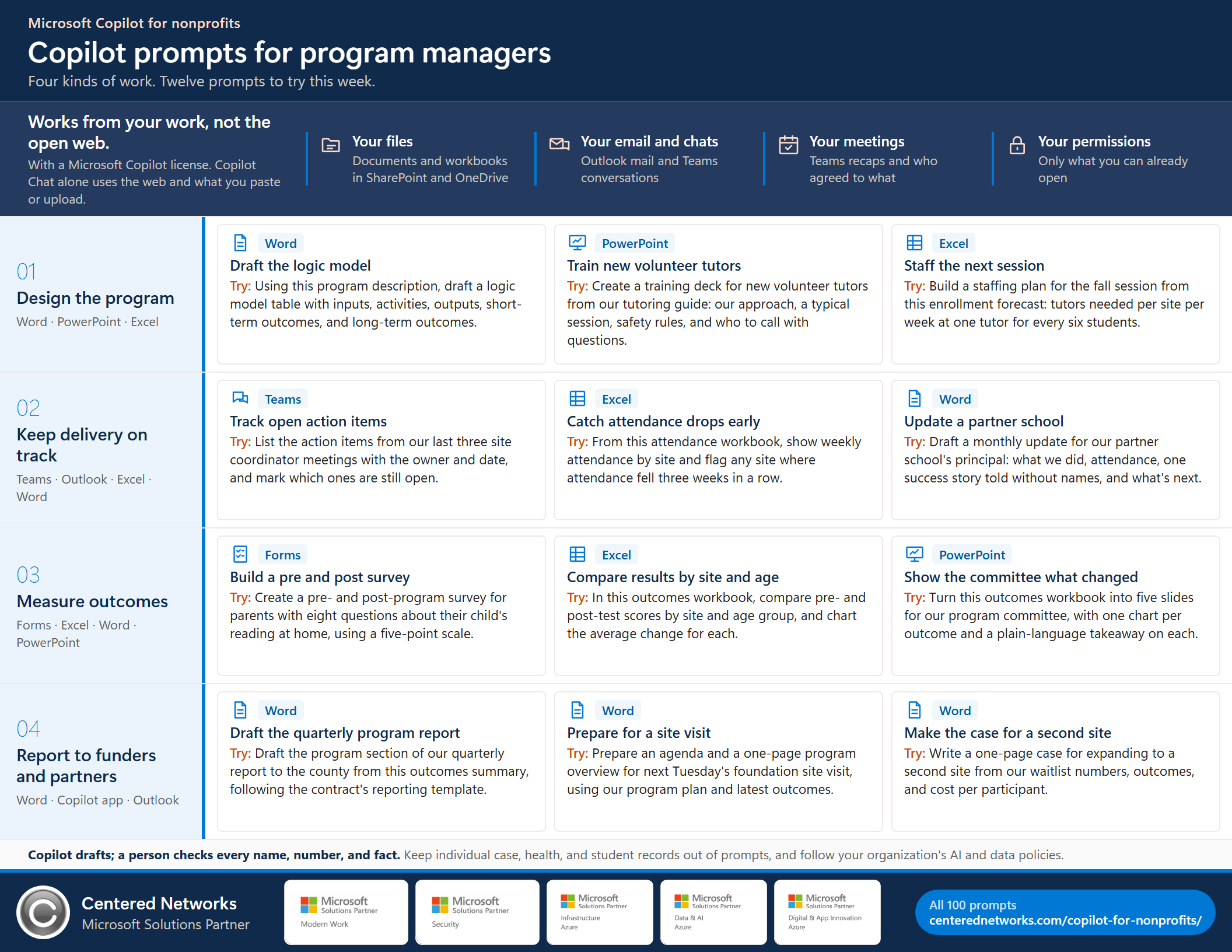
Copilot prompts for program managers, one page. Letter size, landscape. Share it with your team.
A note on data. These prompts work from documents, totals, and program-level information. Follow your organization's AI policy, and keep case notes, health information, and individual records out of prompts unless that policy says otherwise.
Your agent for this role
Start with Program Manager by CN in Copilot Chat, then ground it in your own work.
Logic models, surveys, and funder reports from the numbers you paste in. It runs in the Copilot Chat that comes with Microsoft 365 and drafts only; it can't send, post, or submit anything. When you want it working from your own files, mail, and meetings, the next steps are Microsoft Copilot licenses with a governed pilot, a production agent built on your data, and Managed AgentOps to keep it accurate and in budget.
Beyond prompts
Want it to do the work, not just answer?
Prompts help one person at a time. We are building an AI operating system for nonprofits with founding partners: a governed team of role agents working on your organization's own Microsoft 365, so you get more done with the team you have.
The agents work from how your organization actually runs: funder history, deadlines, recurring work, and the reasons behind decisions. That knowledge stays with the organization when people leave. The executive director gets one approval inbox, every agent gets a scorecard, and nothing goes out until a person approves it.
Questions
Before you start.
Do I need a Microsoft Copilot license to use these prompts?
No, but the license changes what Copilot can see. Microsoft Copilot Chat is included at no extra cost for eligible Microsoft 365 work accounts; it works from the web and from what you paste or upload. A Microsoft Copilot license (formerly Microsoft 365 Copilot) lets Copilot work across the email, meetings, chats, and files you already have permission to open, and puts Copilot inside Word, Excel, PowerPoint, Outlook, and Teams. Prompts tagged Copilot app or Teams need the license to work from your own mail and meetings.
Can I use Copilot with participant data?
Start with program-level and summary information: plans, attendance totals, survey results, and reports. Keep case notes, intake records, and health information out of prompts unless your organization's policy allows it and the right protections are in place.
Will Copilot show me files I'm not supposed to see?
No. Copilot respects your existing Microsoft 365 permissions and only reads content you are already allowed to open. That also means it can surface a file that was shared too widely, so check your sharing settings before a broad rollout.
Does Copilot summarize Teams meetings automatically?
Meeting recaps need transcription turned on, and the full intelligent recap needs a Microsoft Copilot or Teams Premium license. Without them, paste or upload your own notes and ask Copilot to turn them into decisions and action items.
Can we share these prompts?
Yes. Centered Networks wrote them for nonprofit teams. Copy them, change the details to fit your work, and share the page or the one-page PDF.
Prompts for other roles
Sources for the Microsoft facts on this page
Checked on Microsoft Learn on October 13, 2026. Microsoft changes names, features, and licensing often; confirm in your Microsoft 365 admin center before you plan a rollout.
- Overview of Microsoft Copilot Chat (grounding, permissions, Chat versus licensed Copilot)
- Manage Microsoft Copilot Chat (eligibility, the 2026 name change)
- License options for Microsoft Copilot (web-based and work-based chat)
- Using agents in Microsoft Copilot Chat (which agents cost extra)
- Intelligent recap for Teams calls and meetings (license and transcription)
- Get started with Copilot Cowork (prerequisites)
- Manage Copilot Cowork for your organization (usage-based billing and limits)
All prompts on this page are written by Centered Networks. Copy them, adapt them, and share them with your team.