Discovery and product definition
Stakeholder interviews, workflow mapping, requirements, UX direction, data and integration needs, and a clear build or no-build decision.
CompleteCare · Azure Applications
Part of CompleteCare
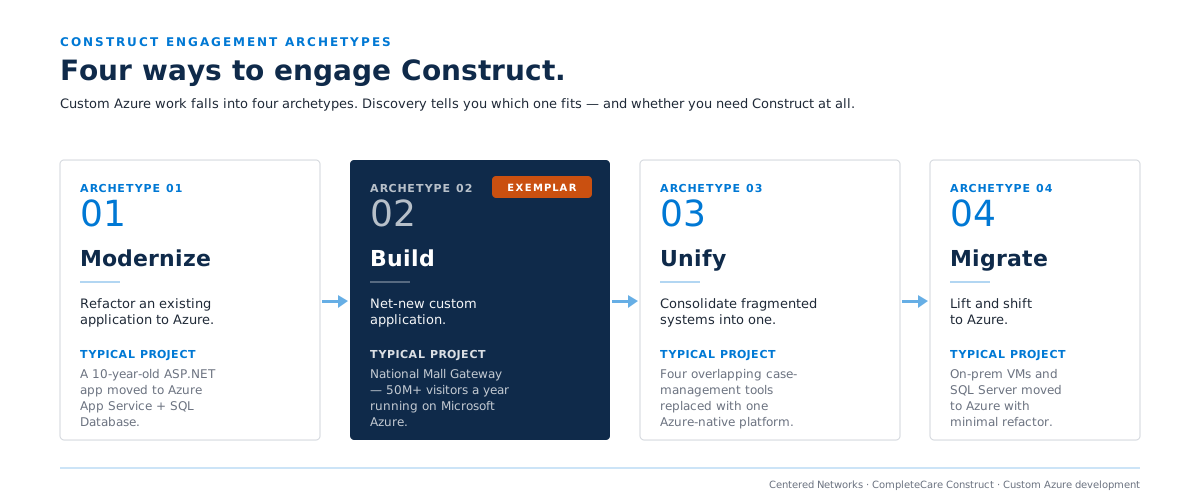
CompleteCare Construct is for workflows that fit neither off-the-shelf SaaS nor low-code. We run discovery, architecture, design, Azure development, security and accessibility testing, launch, hypercare, and optional ongoing operations.
A short form. We reply within one business day.
Custom is the third answer, not the first
During discovery we should be willing to recommend an existing SaaS product, a Power Platform solution, or a custom Azure application.
Construct is valuable because we are willing to stop before a custom build if custom is not the right answer.
The Construct method
Stakeholder interviews, workflow mapping, requirements, UX direction, data and integration needs, and a clear build or no-build decision.
Document the Azure architecture, identity, data, integration, security, observability, availability, and deployment approach before full build.
Deliver in iterative increments with regular demonstrations and product-owner decisions.
Functional, security, performance, accessibility, and user-acceptance testing appropriate to the application.
Deploy through a documented production process with monitoring, rollback planning, operational handoff, and training.
An agreed post-launch period for elevated monitoring and rapid stabilization.
Where desired, continue with application monitoring, bug fixes, platform updates, architecture review, and an enhancement backlog.
Microsoft-native where it creates value
Depending on the use case, Construct may use Microsoft Entra ID, Azure App Service, Container Apps or Functions, Azure SQL, Cosmos DB, Storage, API Management, Application Insights and Azure Monitor, Microsoft Purview integration where appropriate, Power Platform integration, and Microsoft Foundry or other AI services when the application genuinely needs them.
Construct aligns with Microsoft’s application modernization and AI-app platform motion on Azure. Specific Microsoft programs or incentives are confirmed against current eligibility before scope.
Proof
The National Mall Gateway is our flagship Azure application and platform example, built for the Trust for the National Mall and published as a Microsoft customer story.
Commercial model
Term. CompleteCare modules run month-to-month with 30 days’ notice to cancel. There is no 12-month lock-in on the managed service.
Modules are scoped with a defined initiation plan and an ongoing managed-service scope. Full commercial terms are confirmed in the SOW for the selected modules.
Azure consumption, third-party services, and any Microsoft licensing required by the application are separate from Centered Networks fees and are sized to the architecture.
Yes. Discovery ends with a build or no-build recommendation. We should be willing to recommend an existing SaaS product or a Power Platform solution instead, and Construct is more valuable because we are.
You do. The production environment, source, documentation, and deliverables defined in the SOW are customer-owned.
An agreed hypercare period for elevated monitoring and rapid stabilization, then optional ongoing operation covering monitoring, bug fixes, platform updates, architecture review, and an enhancement backlog.
Yes. The National Mall Gateway, built for the Trust for the National Mall and published as a Microsoft customer story.
Tell us what the workflow does, what you have already evaluated, and what constraints the application has to respect. Discovery ends with a build or no-build recommendation.
Might Power Platform be enough? See CompleteCare Automate →
A senior member of our team will reach out within one business day to confirm scope and fit.